
Plug in your iPad, leave it an hour, and nothing happens. If your ipad charging port not working properly, don’t force the cable. That often turns a simple fault into a real repair.
The good news is that many charging issues start outside the iPad. A bad lead, weak plug, blocked port, or software glitch can all stop power getting through. Before we book anything in, we can rule out the easy stuff safely.
Start with the safe checks first
A charging port is like a letterbox. If fluff blocks the slot, the cable won’t sit flush. These are the first checks we suggest:
- Swap the cable and plug. Use an Apple or certified lead with a wall adapter, not a weak laptop USB port.
- Look inside the port with a torch. If you see lint, switch the iPad off and clear it gently with a wooden toothpick, soft brush, or compressed air.
- Let the iPad cool down. Charging can slow or stop when the tablet is too hot or too cold.
- Force restart the iPad. A software hiccup can hide or interrupt charging.
- Check for an update. A quick iPadOS update can sort odd power bugs.
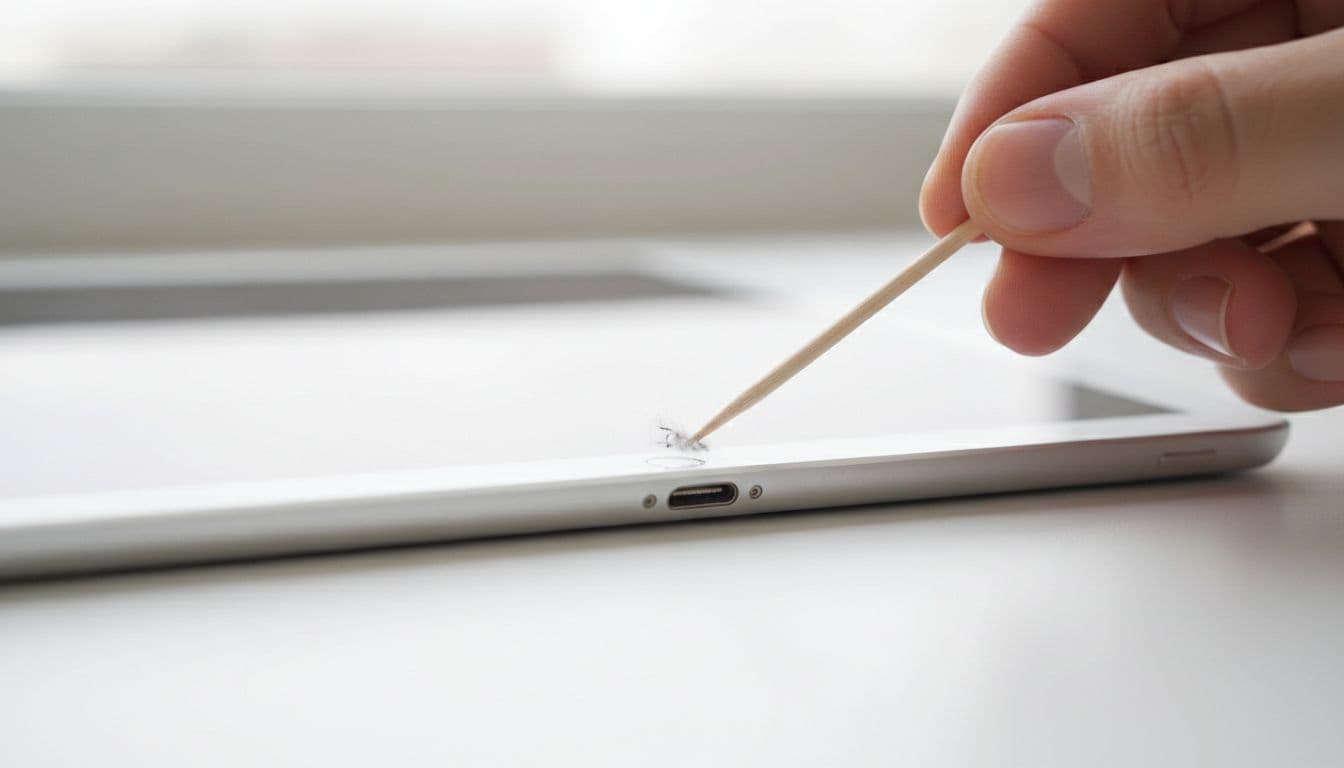
Never use metal pins or liquid cleaner in the port. That’s how people turn a tidy-up into damage.
For extra background, SimplyMac’s iPad charging checks and UGREEN’s charging guide cover the same basics we use on the bench.
Signs the port itself is failing
If the cable only charges when held at a weird angle, that’s a clue. A good port should grip the connector snugly and charge without a wobble.
We also look for a loose fit, bent contacts, or charging that cuts in and out with the slightest touch. Sometimes the iPad starts charging, then stops seconds later. That’s often port wear, not a bad lead.
If charging only works when the lead is propped up, stop forcing it. Loose ports rarely fix themselves.
This week, we saw an iPad 9th Gen from Essex that “just needed a new cable”. In reality, the port was packed with lint and the pins had been stressed from months of sideways tugging on the sofa. A clean helped, but the fit stayed loose, so we replaced the port and retested charging.
That sort of fault is common in phone repair Essex work, especially when tablets live in bags, vans, or crumb-filled drawers.
When home checks stop being safe
There comes a point where home testing becomes a faff. Stop charging and book an inspection if you notice:
- Heat or a burning smell: Warm is one thing, hot is another.
- Green or dark marks: That can point to corrosion or arcing.
- A bent plug tip: Don’t try to straighten it inside the port.
- Liquid exposure: Even a small spill can start hidden corrosion.
- Recent drop damage: A knock can loosen the port flex or crack joints.
If the lead or plug is heating up, our guide to iPhone charging cable overheating fixes UK explains the same warning signs. DIY soldering videos look easy, but iPad ports sit beside delicate boards and flex cables, so one slip can make the job much worse.
How we handle iPad charging faults at Repair My Crack
When an iPad arrives, we test the cable, charger, battery behaviour, and port fit before reaching for tools. Sometimes it only needs a careful clean. Other times the port assembly or flex cable has failed and needs replacement.
Because we also handle mobile phone repair UK jobs every day, we see the same habits across brands. The problems behind iphone screen repair UK, cracked iphone screen repair, iphone battery replacement UK, and samsung phone repair UK often sit beside cheap chargers, damaged leads, and fluff-packed ports.
If you’re local, we can help with drop-in phone repair Essex appointments in Harlow. If you’re further away, our postal phone repair UK service keeps it simple. Book online, pack the device securely, include your order number and any needed passcode for testing, then send it in. We offer free tracked Royal Mail postage and tracked return, and we aim to start work as soon as it arrives.
If the charging issue started after a drop, check for other damage too. Our guide to UK iPad screen replacement prices helps if the tablet also has cracked glass. For Apple handsets, our iPhone repair Essex services cover charge ports, screens, batteries, and more.
Quick questions we hear a lot
Can a blocked port really stop charging?
Yes. A tiny wad of lint can stop the plug seating fully, so power cuts in and out.
Is it worth repairing an older iPad?
Usually, yes, if the rest of the tablet still works well. A port repair is normally far cheaper than replacing the whole device.
Could it be the battery instead?
Sometimes. That’s why we test the full charging path before we recommend any repair.
If your ipad charging port not working after these safe checks, don’t keep wrestling with the cable. We can test it in Harlow or through the post anywhere in the UK, then give you a clear answer without guesswork. Book online when you’re ready, and we’ll aim to get it sorted quickly, with quality parts, a price promise, and warranty cover for peace of mind.
James Waterston, Device Repair Specialist at Repair My Crack