
A dropped iPhone with a dead 0.5 camera is usually more than a small glitch. In most cases, the fall has knocked something inside the phone out of line, damaged the ultra-wide module, or broken a cable.
If the 0.5 option has vanished, the camera goes black, or the picture shakes badly, we treat it as a hardware fault first. A restart can help in rare cases, but after a proper drop, the odds usually point towards repair rather than a settings tweak.
What usually breaks when the 0.5 camera stops working
The 0.5 camera on iPhones is the ultra-wide lens, and it sits close to other delicate parts inside the phone. A sharp knock can damage the module itself, loosen a connector, or split the flex cable that links everything together.
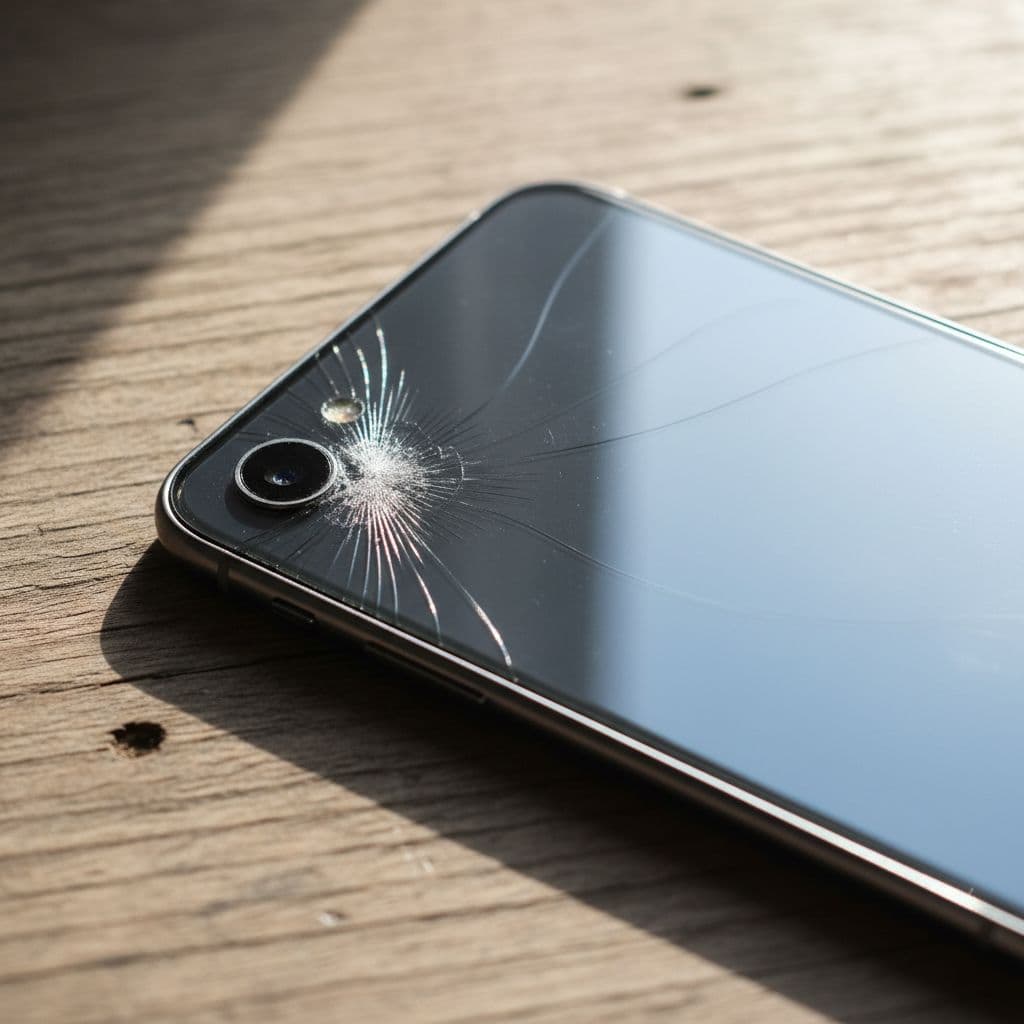
We see this a lot on Pro models, especially when the phone lands on a corner or edge. The outer glass can look fine while the camera itself has taken the hit. Apple Support Community threads also show the same pattern, where the 0.5 option disappears after a fall and won’t come back with a normal restart. See the Apple Support Community thread on the 0.5 ultra-wide lens for a similar symptom.
| Symptom after the drop | Likely fault | What it usually means |
|---|---|---|
| 0.5 button missing | Camera module or cable damage | The phone may not be detecting the ultra-wide camera |
| Black screen on 0.5 | Failed module or loose connector | The camera app cannot open that lens |
| Shaky or blurred image | Impact damage inside the module | The lens or stabilisation part may be affected |
| Cracked lens glass only | Broken outer glass | The camera may still work, but dust and moisture can get in |
If the 0.5x option disappears after a drop, we usually look at hardware first.
If the glass is visibly damaged, our guide on repairing cracked iPhone camera glass is a good place to start. It helps separate simple lens glass damage from a full camera fault.
Quick checks before you book a repair
A few checks can save time, especially if the issue is software-related rather than physical. They take a couple of minutes and cost nothing.
- Restart the iPhone and open the Camera app again.
- Check for an iOS update, then try the camera once more.
- Open the app and switch between 0.5, 1 and 2 or 3 if your model has them.
- Test the camera in photo and video mode.
- Remove the case if it presses on the lens or frame.
- Look closely for cracked glass, a bent frame, or dust under the lens.
If the camera fails only after the drop, we would not spend long hoping for a miracle update. A proper impact usually means something inside has moved or broken. If the phone is still under warranty, keep in mind that physical damage is often handled differently from a fault that appears on its own.
When a repair makes more sense than replacing the phone
A good iPhone 0.5 camera fix often costs far less than a replacement handset. If the rest of the phone is healthy, a camera repair is usually the sensible move. That goes double if the battery is still decent, the screen is fine, and the phone suits your needs.
We had an iPhone 13 Pro in the workshop recently with a dead 0.5 camera after a tumble off a kitchen worktop. The phone still powered on, the main camera worked, and the lens glass looked almost untouched. The ultra-wide module had failed, so a replacement solved it without touching the rest of the phone.
If you’re wondering whether the fault is fixable at all, our guide to broken iPhone cameras walks through the common repair paths.
A repair usually makes sense when:
- only the 0.5 camera has failed
- the rest of the phone works normally
- the screen and battery are still in good shape
- the phone has a strong resale value or you want to keep it longer
A replacement starts to look better when the phone has multiple faults, the frame is badly bent, or the repair cost starts creeping too close to the value of the handset.
What an iPhone 0.5 camera repair costs in the UK
The fault, not just the model, drives the price. A cracked outer lens glass swap is usually cheaper than a full ultra-wide camera module replacement. On many independent jobs, prices sit somewhere between £65 and £179, depending on the device and the exact damage.
For a closer look at real pricing, see our iPhone rear camera repair prices. That guide is useful if you’re comparing repair quotes and want a rough idea before booking.
Here is a simple guide:
| Type of fault | Typical UK price range | Notes |
|---|---|---|
| Outer lens glass only | Lower end of the range | Good news if the camera module still works |
| Loose connector or cable issue | Mid range | Needs the phone opened and tested |
| Full ultra-wide module replacement | Higher end of the range | Common after a solid drop |
The cheapest repair is not always the best one if the parts are poor or the job is rushed. We use quality parts, give clear quotes, and keep the aim simple, which is to get the phone working properly without mucking around.
How our postal phone repair service works
Our postal phone repair UK service is handy when you are not near Essex or you just want the phone sorted without a trip out. We also handle phone repair Essex jobs by appointment for local customers.
The same workshop handles mobile phone repair UK work every day, including samsung phone repair UK, iphone screen repair UK, iphone battery replacement UK, and cracked iphone screen repair alongside camera faults. So if your phone has taken a proper beating, we can often deal with more than one issue in the same visit or postal booking.
The process is straightforward:
- Book the repair online.
- Pack the phone securely in a padded box.
- Add your order number and any passcodes we need for testing.
- Post it to us using a tracked service.
- We inspect it, confirm the fault, and start the repair as soon as it lands, often the same day.
Keep the packaging tight so the phone does not rattle around. Also, back it up before posting if you can. That gives you peace of mind in case the damage gets worse during testing or the phone needs a deeper repair.
Questions we hear most often
Can the 0.5 camera fail while the other lenses still work?
Yes. That happens quite a lot. The main camera can still behave normally while the ultra-wide lens has failed on its own.
Will a drop damage the camera even if the lens glass looks fine?
Yes again. The glass may survive the fall, but the shock can still damage the module or cable inside the phone. That is why a phone can look almost untouched and still refuse to open the 0.5 lens.
Is it worth repairing an older iPhone?
Usually, if the rest of the phone is in good nick. If the battery is tired, the screen is cracked, or there are other faults, we would compare the repair total with the value of the handset first. That way you are not spending good money after bad.
Conclusion
A dropped iPhone with a dead 0.5 camera is usually a hardware problem, not a settings issue. Once the phone has taken impact, the ultra-wide module, flex cable, or connector often needs attention.
The good news is that this fault is often repairable, and in many cases the fix is far cheaper than replacing the phone. If your lens glass is cracked, the camera is black, or the 0.5 option has vanished altogether, we can usually tell you quickly what is going on.
If you are stuck with it right now, book a repair online and send the phone in for a proper check. We will get it looked at, keep the quote clear, and aim to have it sorted as quickly as we can.
James Waterston, Device Repair Specialist at Repair My Crack