
If your iPhone charging lead feels like it’s warming your hand, you’re not being dramatic. iPhone charging cable overheating can be harmless, or it can be your first warning that something’s about to fail.
Here’s the straight answer we give at the counter in Harlow: a cable getting slightly warm can be normal, especially with fast charging. A cable getting hot (too hot to hold, smelling odd, or showing discolouration) isn’t normal, and we shouldn’t keep using it.
We’ll run through the common UK causes we’re seeing in 2026, how to narrow it down at home, and when it’s time for a proper repair.
Warm vs hot: the quick safety line we use in the workshop
A bit of warmth at the plug end is expected. Power moving through metal always creates some heat. In 2026, lots of us charge faster than we used to (USB-C Power Delivery plugs, higher wattage adapters, charging while using the phone), so warmth is more common.
Hot is different. Heat usually means resistance somewhere in the chain. Think of it like water trying to squeeze through a kinked hose. The “kink” might be a damaged wire, a loose connector, fluff in the port, or a tired battery pulling power inefficiently.
Watch for these red flags:
- The cable is hot at one spot (often near the connector).
- The plug or phone port looks browned, warped, or smells “electrical”.
- Charging cuts in and out when the cable moves.
- The phone throws a temperature warning, dims, or stops charging.
If it’s uncomfortably hot, unplug it and stop using that cable and plug. Heat damage tends to get worse, not better.
Once we’ve drawn that line, we can work out why it’s happening.
Common causes of iPhone charging cable overheating in the UK (2026)
Most “hot cable” jobs come down to one of four areas: cable quality, power supply, port condition, or the phone itself.
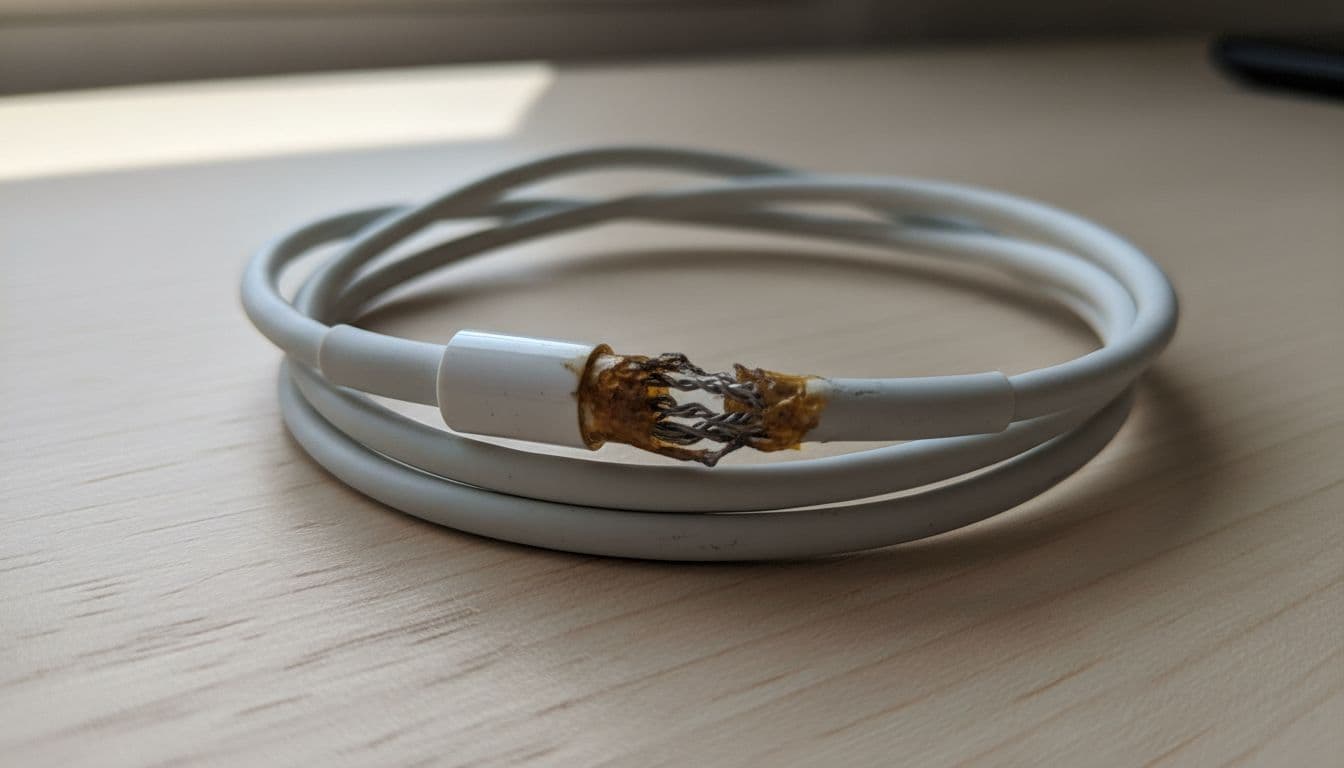
1) Worn or damaged cable insulation
If the lead’s been bent sharply in a car, trapped under a sofa leg, or yanked from the plug for months, the copper strands inside can fray. That creates higher resistance, which creates heat. Even “fine on the outside” cables can be broken inside near the connector.
2) Cheap or non-certified cables and plugs
We see plenty of bargain cables that charge, but run hotter. They often use thinner conductors and weaker strain relief. In plain terms, they struggle to carry the current cleanly. For a decent overview of why chargers heat up and how to reduce it, Anker’s guide on why a charger gets hot explains the basics well.
3) Fast charging plus real-world heat traps
Fast charging pushes more power, therefore more heat. Add a thick case, direct sun on a dashboard, or charging under a pillow, and the whole system runs warmer. The cable then “inherits” heat from the phone and connector.
4) Dirty, loose, or damaged charging port
Pocket lint is the silent villain. A tiny mat of fluff can stop the connector seating properly, so the contact area shrinks and the connection heats up. If the port’s worn, the plug can wiggle and arc slightly under load (again, heat).
Simple checks we can do at home (before we book anything in)
We don’t need special tools for the first round of checks, just a bit of patience and a sensible approach. Here’s what we do (and what we suggest customers do) to narrow it down.
- Try a different wall plug and socket: Avoid old extension leads and loose USB sockets on lamps or sofas. A poor power source can run hot.
- Swap the cable: If the heat follows the cable, that’s your answer. If it stays with the phone, look at the port or battery.
- Inspect the ends in good light: Any greenish tint, dark marks, or wobble is a warning.
- Check the charging port for lint: Use a torch. If you must clean it, use something non-metallic and gentle (a wooden toothpick works), and don’t ram it in.
- Let the phone cool and charge idle: Stop gaming or streaming while charging. Take the case off for a test.
If the cable is hot even when the phone’s idle, we treat it as a safety issue.
We also find some customers end up on our blog after searching for things like mobile phone repair UK because the symptoms overlap with other faults. If you want a wider view of what tends to go wrong, our write-up on the most common iPhone issues repaired is a handy reference.
The questions customers ask us most
“Is it the cable or the iPhone?”
If only one cable gets hot, it’s usually the cable. If every cable gets hot, it’s usually the phone’s port or battery.
“Can I keep using it if it still charges?”
We wouldn’t. Heat means stress. Stress turns into failure at the worst time.
“Does this happen on Samsung too?”
Yes. We see it across brands, and we do samsung phone repair UK jobs for the same mix of causes (ports, batteries, damaged leads).
What we typically repair (and a real example from the bench)
Last month, a customer from Essex brought in an iPhone 15 that “only got hot with one cable”. The cable looked fine, but the connector had a tiny amount of heat deformation. When we tried a known-good cable, it still warmed up more than we liked.
The real culprit was a partially blocked USB-C port plus a battery that was ageing faster than expected. The port had compacted lint, so the plug never seated fully. That small gap created heat at the connector. After a careful port clean and testing, charging temps improved. In the end, the customer also chose an iphone battery replacement UK because the phone was warming during normal use too.
If you’re local and need phone repair Essex, we can sort this in our Harlow appointments. If you’re further away, we handle postal phone repair UK jobs daily, and we aim to start as soon as the device arrives.
For iPhone faults that need hands-on work, our main iPhone repair Essex service page outlines what we fix, including ports, batteries, and charge issues.
Repair vs replacement: what makes sense in the UK right now?
Sometimes the best fix is simply binning a dodgy lead and buying a better one. Other times, the cable is only the messenger.
Here’s a quick guide we use when advising customers:
| What’s happening | Most likely cause | Sensible next step | Typical UK cost range |
|---|---|---|---|
| Cable hot at one bend point | Internal cable damage | Replace cable (certified) | £15 to £30 |
| Heat at plug and socket end | Poor plug or adapter | Replace plug, avoid cheap adapters | £15 to £40 |
| Heat at phone connector, wobbly fit | Dirty or worn port | Port clean, then port repair if needed | £0 to £120 |
| Phone warms even when idle charging | Battery wear or internal fault | Diagnostics, possible battery replacement | £49 to £120 |
The takeaway: if the heat follows the cable, replace the cable. If the heat follows the phone, we should stop guessing and test it.
This is also where other repairs get pulled in. We often see a charging issue alongside a drop or damage, so people asking for cracked iphone screen repair end up mentioning “and it charges weirdly too”. If you’re comparing options, our post on can a broken iPhone be repaired helps set expectations on what’s worth fixing.
One last note: a failing cable is annoying, but a failing port or battery can snowball. When we’re already inside a handset for a charge issue, we’ll flag anything else we spot, such as early battery swelling or previous impact damage. That’s the same approach we take whether it’s iphone screen repair UK work or a charge fault.
Conclusion
iPhone charging cable overheating is usually caused by resistance from a damaged lead, a poor-quality plug, a dirty port, or an ageing battery. Warm is fine, hot isn’t. If swapping the cable and plug doesn’t change it, we should treat it as a phone fault and get it checked before it worsens.
If you’re stuck, we can help in Essex or via our nationwide post-in service. We’ll test properly, explain what’s actually failing, and get you charging safely again.
– James Waterston, Device Repair Specialist at Repair My Crack