iPhone 15 Pro Action Button Not Working After a Drop UK Fixes
Dropped your iPhone, picked it up, and now the iPhone 15 Pro Action Button won’t respond? It’s the sort of tiny fault that makes the whole phone feel broken, especially if you rely on it for Silent Mode or a Shortcut.
Here’s the good news: after a drop, this problem is often fixable without replacing half the handset. In my repair bench experience, it’s usually a jammed button, a case pressing in the wrong place, or a setting that’s got confused. If it’s hardware damage, it’s still repairable in most cases, just not with a quick poke and a prayer.
I’m James Waterston at Repair My Crack, and below are the checks I’d run with you at the counter, plus realistic UK repair options.
iPhone 15 Pro Action Button not working after a drop: quick checks first
A drop can knock grit into the button gap or slightly twist the frame, so start with the simple stuff. You’re trying to work out if it’s blocked, misconfigured, or genuinely broken.
- Take the case off and test again
Some cases sit slightly proud around the Action Button. After a drop, that alignment can shift enough to stop the press-and-hold registering. - Clean around the button (gently)
Use a dry microfibre cloth first. If you’ve got compressed air, short bursts at an angle can lift lint. Avoid anything metal or sharp. - Confirm you’re pressing it correctly
The Action Button needs a press-and-hold, not a quick tap. Hold for about a second until you feel the haptic response. - Reassign the Action Button, then switch back
Go to Settings, Action Button, pick a different action (Torch is a good test), then switch back. Apple explains the options in their guide to customise the Action button. - Restart, then update iOS
A restart clears odd glitches. After that, check Settings, General, Software Update. As of March 2026, I’ve not seen any recall for this issue, it’s mostly physical damage or a software wobble.
Apple’s own checklist for stuck or unresponsive buttons is worth a read too, especially the cleaning and case points: if a button or switch isn’t working.
If the button feels physically stuck, don’t jab it with a pin. That’s how a small jam turns into a torn seal or damaged internal switch.
If those steps don’t change anything, move on to symptom spotting. That tells you whether you’re looking at settings, impact damage, or a deeper issue.
When it’s more than a setting: signs of real drop damage
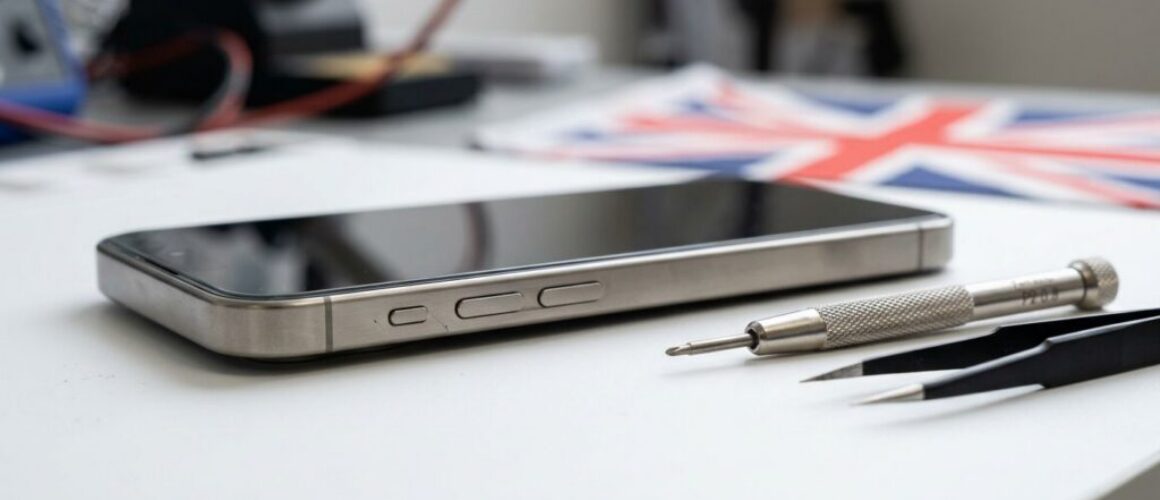
Sometimes the Action Button stops working because the impact did more than scuff the corner. A dent on the left rail can pinch the button mechanism. I also see failures where the internal switch or flex cable has taken the hit.
Look out for these common patterns:
- Button feels mushy or doesn’t click: Often a mechanical problem, such as a bent button bracket.
- Button works only at certain angles: That can point to frame distortion from the drop.
- Intermittent response with haptics missing: Can be software, but after a drop it’s often hardware contact issues.
- Other faults appear at the same time: A cracked screen, a dead patch on the display, or Face ID issues suggests a heavier impact.
For reassurance, you’re not the only one seeing it. There are plenty of user reports in the Apple forums, for example this thread on an unresponsive side button on iPhone 15 Pro. Community threads won’t diagnose your phone, but they do show how common the behaviour is after a knock.
If you’ve also got charging issues after the drop, that matters. A phone that needs broken charging port repair or phone not charging repair might have rail damage affecting more than one part.
UK repair routes: Apple, local Essex support, or phone repair by post UK
If the button still won’t behave, you’ve got three sensible paths: Apple, a trusted independent repairer, or a postal phone repair UK service.
Apple route (good for warranty situations)
If your iPhone is in warranty or you have AppleCare+, start there. Without cover, “other damage” pricing can be steep, so ask for a clear quote after inspection. People also look for alternatives to Apple Store screen repair UK when they don’t want the higher out-of-warranty bracket.
Independent repair (often the practical option)
Independent shops can usually repair button faults without turning it into a full device replacement. At Repair My Crack, we see Action Button issues alongside day-to-day iPhone repairs like iPhone screen replacement, iPhone battery replacement, and camera or speaker faults. We also handle water damaged phone repair UK diagnostics because drops and puddles seem to find each other.
We’re Essex-based, so if you’re searching mobile phone repairs Essex, phone screen repair Essex, iPhone repair Essex, or iPhone screen repair Essex, we can help locally. If you’re a Samsung user reading this, we also cover Samsung Phone repair and Samsung Repairs, including Samsung phone repair Essex and Samsung screen repair Essex.
And if you’re not nearby, our mobile phone repair UK service includes phone repair by post UK. Book online at Repair My Crack, pack the device securely, include your order number, and add any passcodes we’ll need for testing. We aim to start work as soon as it arrives, often the same day.
One last thing, because I see it every week: people google “Repair My Crack phone repair” and “Repair My Crack reviews. best phone repair shop in Essex” before they commit. That’s sensible. Do your checks, then choose the option that gives you proper peace of mind.
Also, for companies with multiple devices, we support business workflows too: business mobile phone repairs UK. business laptop and tablet repairs. trusted phone repair service UK.
Costs, turnaround, and the usual “is it worth it?” questions
Button repairs vary because sometimes the button mechanism is fine, but the frame has pinched it. Other times the internal switch needs replacing. Either way, it’s typically far less than a full handset replacement.
Here’s a quick guide, including the phrases people search for like iPhone screen replacement cost UK and Samsung screen replacement cost UK. Prices vary by model and parts quality, so treat these as sensible ranges until a technician confirms the fault.
| Repair type (UK typical ranges) | What you might pay | Notes |
|---|---|---|
| iPhone 15 Pro button repair (Action Button related) | £75 to £130 | Depends on impact damage and parts needed |
| iPhone screen replacement cost UK | £250 to £450 | Higher if the frame is damaged too |
| Samsung screen replacement cost UK | £180 to £400+ | Model matters a lot, S and Fold ranges differ |
| phone battery replacement UK | £45 to £120 | Includes iPhone battery replacement on many models |
Turnaround is another big one. People ask how long does phone screen repair take UK all the time. In-shop, screens and batteries are often same day, while postal jobs depend on delivery times and testing needs. For Essex customers, we try to keep things quick, especially for iPhone battery replacement Essex bookings where the phone just won’t last a commute.
If you’re weighing up is it worth repairing a cracked iPhone screen, I usually say this: if the phone is otherwise solid, repair wins. It’s like replacing a smashed window rather than buying a new house. If you need to fix cracked iPhone screen damage plus a button fault, we’ll quote both so you can decide without guessing.
Finally, always ask about phone repair with warranty UK terms. Some places advertise lifetime warranty phone repairs, but the wording matters, so read the exclusions. At Repair My Crack we provide a warranty on repairs for extra confidence, alongside our price promise and affordable phone repairs UK aim.
Conclusion
A dropped iPhone 15 Pro with a dead Action Button is annoying, but it’s usually fixable. Start with cleaning, case checks, and settings, then move to a proper inspection if the button feels wrong. If you want a straightforward option, book in with Repair My Crack and we’ll diagnose the iPhone 15 Pro Action Button properly, either in Essex or via post, then get you back to normal without the faff.
– James Waterston, Device Repair Specialist at Repair My Crack