
You've picked up your iPhone 11 Pro Max after a drop, and the display looks alarming. Perhaps the glass is fractured, the image has vanished, or touch works only in patches. Before booking the first screen replacement you find, stop and identify what has failed. A cracked front, a damaged OLED panel, a charging fault and a software problem can look surprisingly similar.
The iPhone 11 Pro Max screen remains a premium repair, not a simple sheet of glass. Apple's UK screen-damage charge is £389, rising to £469 when the screen and back glass are both damaged, according to Apple's UK repair pricing. The sensible decision is therefore diagnostic first, price comparison second, and repair booking third.
Table of Contents
- Is Your iPhone 11 Pro Max Screen Actually Broken
- Diagnosing Display Problems Before Paying for a Repair
- Understanding the Super Retina XDR OLED Panel
- Comparing Apple and Independent Screen Repair Prices
- Deciding Whether to Repair or Replace Your Device
- How Mail-In and Workshop Screen Repairs Work
- Your Consumer Rights and Warranty Protections
Is Your iPhone 11 Pro Max Screen Actually Broken
A customer often arrives after a drop convinced the phone needs a complete display assembly. The glass may have a dramatic spider-web pattern, but the picture remains bright, touch responds normally and Face ID still works. In that situation, the phone has suffered cosmetic front-glass damage, not necessarily total OLED failure.
That distinction matters because the iPhone 11 Pro Max uses a bonded OLED and touch assembly. If the image, touch layer or underlying panel has failed, a full assembly replacement is usually the practical route. If the outer glass is damaged while the OLED and digitiser remain sound, a specialist may discuss glass-only repair, although not every workshop offers it and the process demands specialist equipment.
What the symptoms suggest
Look at the phone in a bright room and check the display methodically:
- Cracked glass only: The image remains consistent, with no black blotches, coloured lines or missing areas, and touch works across the panel.
- OLED damage: Black patches, ink-like spreading, persistent lines, colour distortion or a display that stays dark after the phone clearly powers on point towards panel damage.
- Digitiser failure: Touch may fail in a particular strip, register touches you didn't make, or stop responding while the picture remains visible.
- Power or charging trouble: A black screen doesn't automatically prove display failure. Apple's UK troubleshooting guidance says a blank or black screen can relate to battery or charging faults, so connector checks and retesting should happen before replacement. See our guide to an iPhone screen that's black while notifications still work.
Try a force restart, connect a known-good charger and listen for alerts or vibration. If the phone reacts but the display stays blank, a technician should inspect power delivery, the display connector and the assembly before quoting a screen.
Workshop rule: Don't pay for a screen until someone has confirmed whether the phone is receiving power and whether the display assembly is the failed component.
Software can also confuse the diagnosis. An update, app conflict or temporary iOS fault may cause flickering or unusual touch behaviour. Back up the device if possible, install available iOS updates and retest. If the fault remains, treat it as a hardware diagnosis rather than assuming that every visible symptom requires a new screen.
Diagnosing Display Problems Before Paying for a Repair
Start with the simplest test. Remove the case and screen protector, clean the surface, then inspect the display while the phone is active and showing a plain background. A crack limited to the top glass is a different repair problem from a black patch that obscures icons or a line that remains visible across every app.
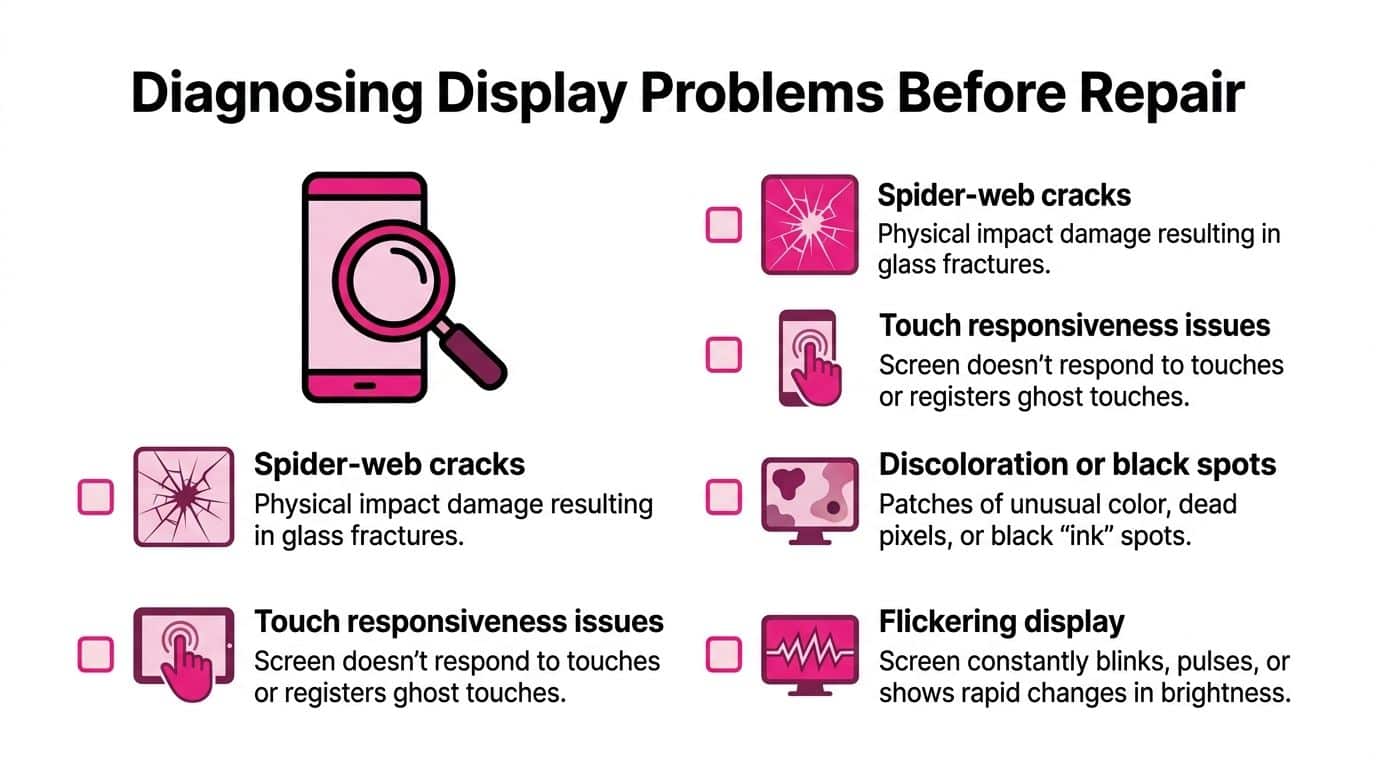
Use this symptom checklist
- Test the picture. Open Photos or a plain webpage. Look for dead areas, green or white lines, uneven brightness and colour bleeding. A stable image with broken glass alone may not need a full panel replacement.
- Test touch across the whole screen. Drag an app icon slowly from one corner to another, type across the keyboard and open Control Centre from different edges. Missed swipes or a repeated phantom tap indicate digitiser trouble.
- Check brightness and True Tone. Open Display & Brightness and see whether True Tone remains available. Its absence can indicate a previous non-genuine display replacement, although a technician should confirm the cause rather than diagnose from one menu alone.
- Check Face ID. Test the phone several times in normal light. Damage around the notch, or an incorrectly handled front sensor assembly during earlier work, can affect authentication. A screen repair must protect and test these components.
- Separate display failure from charging failure. Note whether the phone vibrates, rings, appears in Find My, or responds when connected to a charger. Apple's troubleshooting approach supports checking charging and connectors before authorising display replacement.
Green or white lines that appear after an iOS update deserve a proper retest before parts are ordered. Restart the phone, update it fully and record whether the line appears during startup as well as inside iOS. A fault visible before the operating system loads is more suspicious for hardware than one limited to a single app.
The right outcome might be a full OLED assembly, a glass-only service, a charging repair or a diagnostic appointment. A reputable repairer should tell you which one applies and explain what testing supports that recommendation.
Here's a short visual walkthrough of the repair process and the checks a technician should make:
Understanding the Super Retina XDR OLED Panel
The original panel is a 6.5-inch Super Retina XDR OLED display with a 2688 by 1242 resolution and approximately 458 ppi, as listed in Apple's iPhone 11 Pro Max technical specifications. That density keeps text and fine detail sharp at normal viewing distances, so panel damage often appears as line artefacts, colour non-uniformity or touch mismatch rather than a crack alone.
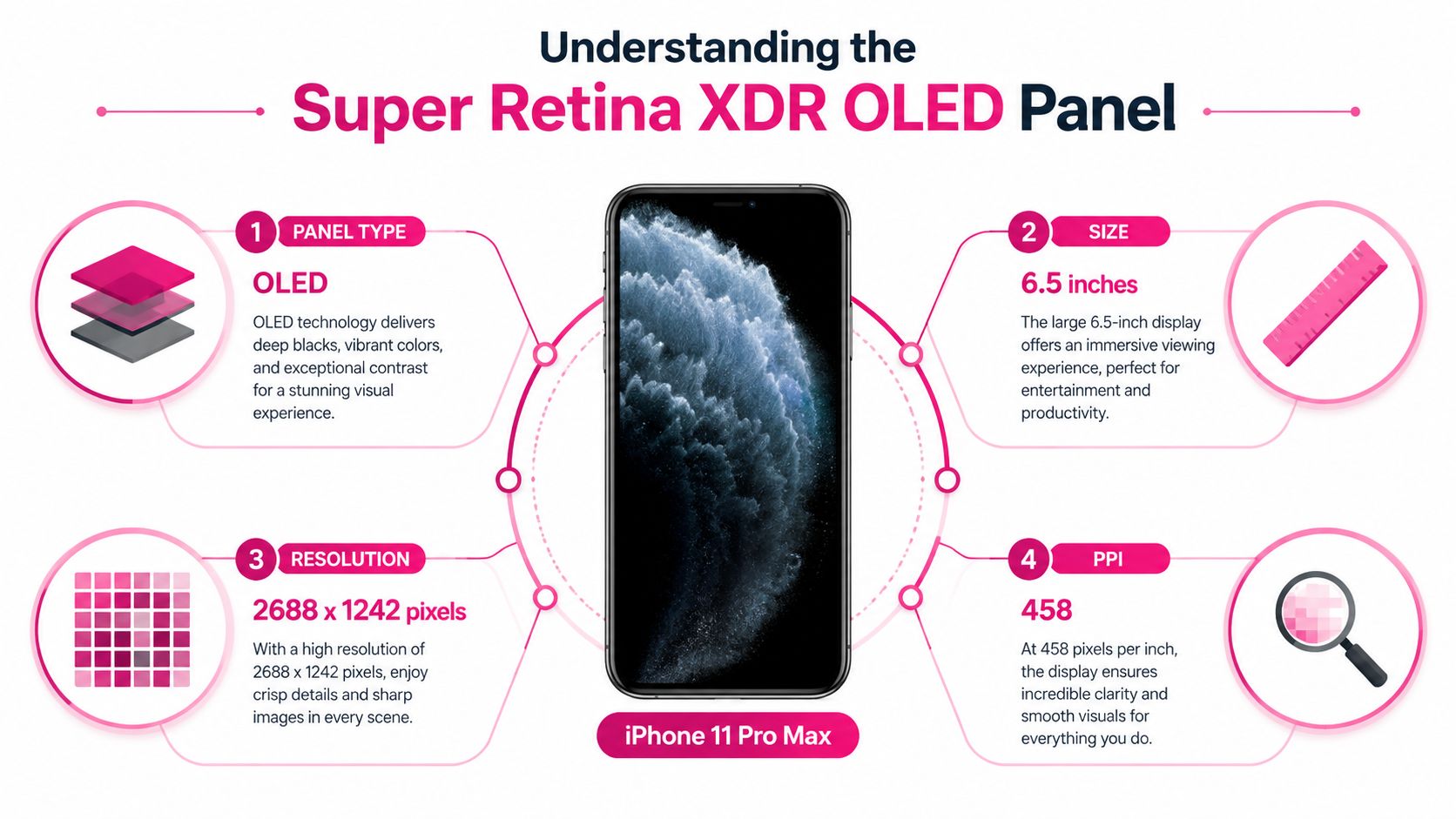
Why the panel affects the repair
OLED pixels produce their own light, unlike the backlit LCD approach used on many older phones. That gives the iPhone 11 Pro Max its deep blacks and high contrast, but it also means the replacement part needs to reproduce brightness, colour, touch response and viewing consistency across a large, bonded assembly.
Apple specifies 800 nits typical brightness, 1,200 nits peak HDR brightness, a 2,000,000:1 contrast ratio, True Tone and P3 wide colour for this display. UK-accessible independent testing measured about 811 nits at maximum manual brightness, close to Apple's typical-brightness claim, as reported in GSM Arena's display review.
A cheap replacement can still illuminate and respond to touch while looking noticeably inferior. Common differences include weaker outdoor visibility, less convincing blacks, altered colour temperature, uneven brightness and a less natural touch response. The lowest quote isn't automatically poor, but you should ask what panel type is being fitted and whether the technician will test colour, brightness, touch, proximity sensing and Face ID-related functions.
The display also forms part of a sealed, high-value chassis. Opening the phone carries teardown risk, and the front sensor components need careful handling. That's why a proper quote should account for the complete assembly and the testing afterwards, not just the cost of a piece of glass.
Comparing Apple and Independent Screen Repair Prices
Apple provides the clearest official benchmark for a damaged iPhone 11 Pro Max screen. Its UK repair information lists £389 for screen damage only and £469 where the screen and back glass are both damaged, subject to Apple's service terms and inspection. Those prices make Apple the straightforward choice for owners who prioritise an official repair pathway and are prepared to pay the premium.
Independent pricing is more varied because shops use different parts and offer different labour, warranty and testing arrangements. UK listings include £150.82 ex VAT for one screen price and £289.95 in another repair-price guide, shown on UK third-party Apple repair price listings. These are comparison points, not universal quotes. A shop still needs to inspect the phone for additional damage.
| Service Provider | Estimated Cost | Part Type | Warranty | Turnaround Time |
|---|---|---|---|---|
| Apple or an Authorised Service Provider | £389 for screen damage only, £469 with back-glass damage | Apple service part or service assembly, subject to inspection | Confirm the applicable Apple service terms before booking | Confirm at booking |
| Independent repairer, lower listed price point | £150.82 ex VAT listed price | Confirm whether OLED is refurbished or aftermarket | Get parts and labour terms in writing | Confirm with the shop |
| Independent repairer, higher listed price point | £289.95 listed price | Confirm the exact panel grade | Get the warranty scope in writing | Confirm with the shop |
Before choosing, ask five direct questions:
- Which panel is being fitted? Ask whether it's an original refurbished OLED, a compatible OLED or another part grade.
- Will True Tone be checked? The technician should explain what functions are tested after fitting.
- Is the quote conditional? Water exposure, bent housing, damaged connectors or back-glass damage can change the final price.
- What does the warranty cover? Clarify dead pixels, touch faults, delamination, labour and accidental damage.
- What happens to your data? Ask whether you need to disable Find My and whether the repair requires a passcode.
Independent repair can offer a meaningful saving, but the part quality and workmanship decide whether that saving is sensible. For a detailed explanation of UK pricing variables, use this iPhone screen repair cost guide.
Deciding Whether to Repair or Replace Your Device
I'd repair an iPhone 11 Pro Max when the rest of the phone is sound. I'd be much less enthusiastic if the battery is weak, the frame is bent, the back glass is damaged and the phone already has charging or camera faults. A screen quote should never be judged in isolation.
The model launched in the UK at £1,149 for 64GB, £1,299 for 256GB and £1,499 for 512GB, according to O2's UK specifications. Those launch prices establish its original premium position, but they don't tell you what your particular handset is worth now. Storage, battery condition, cosmetic state and network status all affect a second-hand valuation.
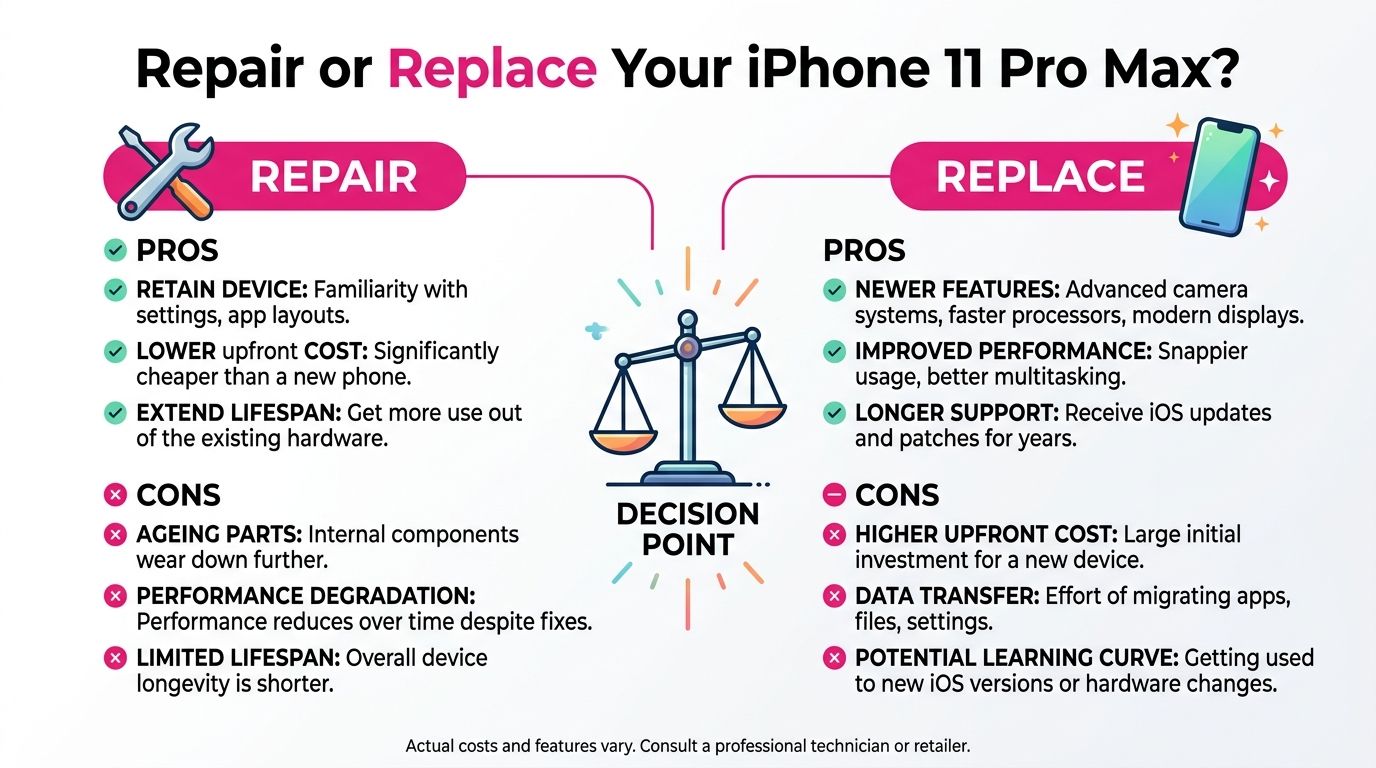
The decision I'd make at the bench
Write down these figures before approving work:
- Repair total. Include the screen, any back-glass or frame issue, delivery and possible diagnostic charges.
- Working-phone value. Check current private-sale and trade-in offers for the same storage capacity and condition. Don't compare your damaged phone with a pristine example.
- Upgrade gap. Find the actual amount needed to move to the replacement phone you'd buy, including accessories or an unwanted contract change.
- Remaining faults. Battery wear, camera faults, Face ID problems and charging issues can turn one repair into a sequence of expenses.
Repair is the sensible route when the phone is otherwise reliable, you like the size and camera, and the quote is comfortably below the value you're preserving. Replace it when the screen is only one of several major faults, or when the repair would leave too little financial distance between an older repaired handset and a newer alternative.
Don't use a generic rule such as “repair only if it costs half the phone's value”. The correct threshold depends on your storage capacity, battery, condition and how much you'd spend to upgrade. Get a live quote, get a realistic valuation for your exact device, then make the choice with those two figures in front of you.
How Mail-In and Workshop Screen Repairs Work
A mail-in repair suits owners who don't live near a suitable technician or can manage without the phone during transit. A workshop appointment suits anyone who wants to hand the device over directly, discuss the fault face to face and collect it after testing. Neither option removes the need for a proper diagnosis.
Preparing a mail-in repair
Back up the iPhone to iCloud or a computer before handing it over. If the phone works, disable Find My iPhone as requested by the repairer, remove personal accessories and follow the supplied packing instructions. Don't send loose devices in an oversized box where they can move around.
A responsible provider should explain tracking, transit protection, the repair scope and the process for approving extra work. Repair My Crack offers UK-wide mail-in service with tracked Royal Mail postage, transit insurance up to £750, online booking and repair-status tracking, according to its mail-in phone repair service.
What happens in a workshop
At an appointment-based workshop, the technician should record the phone's condition before opening it. That includes noting existing frame or back-glass damage, confirming the reported symptoms and checking whether the phone powers on. Ask whether the work is same-day or requires a later collection, and agree how you'll be contacted if the initial quote changes.
After the replacement, test the phone before accepting it:
- Display: Check uniform brightness, colour, black levels and viewing angles.
- Touch: Type, swipe from each edge and test the areas that failed before repair.
- Sensors: Test Face ID, the proximity sensor during a call and automatic brightness.
- Cameras and audio: Make a call, test the front camera, play audio and confirm the earpiece works.
- Charging: Connect a cable and confirm that the phone recognises it reliably.
Keep the written invoice and warranty details. If you're sending the phone, confirm the return address and tracking information. If you're using a workshop, ask for a clear collection condition report. Good repair logistics are ordinary but important, because they give you evidence if the result doesn't match the agreed work.
Your Consumer Rights and Warranty Protections
A repair warranty and your statutory rights are different protections. The repairer's written warranty should state what it covers, while the Consumer Rights Act 2015 governs faulty goods and services in relevant consumer transactions. The Act says the trader must bear the cost of an appropriate repair or replacement for faulty goods, as explained in the UK legislation notes.
Government guidance says that if you return faulty goods within 6 months, the seller must repair or replace them unless it can prove they weren't faulty when sold. It also states that consumers have up to 6 years to bring a claim in England and Wales, or 5 years in Scotland, as set out in government consumer guidance.
That doesn't mean accidental damage is covered. A later drop, liquid exposure or impact can fall outside a repair warranty. It does mean you shouldn't accept recurring touch failure, dead pixels or separation without first checking the written terms and raising the issue promptly.
Before booking, confirm the part grade, labour coverage, exclusions, return process and warranty duration in writing. Keep the receipt, photographs of the phone before repair and all messages about the agreed fault. If the repair fails, request a proper reinspection and give the trader a reasonable opportunity to put the work right before pursuing another remedy.
If your iPhone 11 Pro Max screen has failed, Repair My Crack can assess the symptoms, compare the repair route with the likely cause and complete eligible work through UK mail-in service or an appointment-based Harlow workshop. Visit Repair My Crack to check the current repair option, arrange tracked postage or request a clear quote before committing.