
On iPhone 6 and later, open Settings > Battery > Battery Health and Charging to check your battery. Maximum Capacity shows its current condition, while a service recommendation tells you whether Apple thinks inspection or replacement is appropriate.
You may be checking this after your iPhone suddenly drops from a comfortable charge to low power during a train journey, or while deciding whether a second-hand handset is worth buying. In the UK, the Battery Health screen is useful for more than a percentage. It can help you judge whether the battery is ageing normally, whether its performance is being managed, and whether the information itself can be trusted.
The most reliable decision comes from reading the diagnostic panel alongside your phone's behaviour, usage history, and, where necessary, a professional inspection. A low reading doesn't automatically mean you need a new phone, but a verification warning or repeated shutdowns deserves more attention than a number viewed in isolation.
Table of Contents
- Where to Find iPhone Battery Health in Settings
- What Maximum Capacity and Service Recommendations Mean
- Using Battery Diagnostics to Decide Between Repair and Replacement
- Calibrating Usage Habits and Recognising When to Book a Repair
- Quick Battery Health Checklist for UK iPhone Owners
Where to Find iPhone Battery Health in Settings
A sudden battery warning can make you suspect the worst. Before changing settings or booking a repair, open the built-in report and check what iOS is telling you.
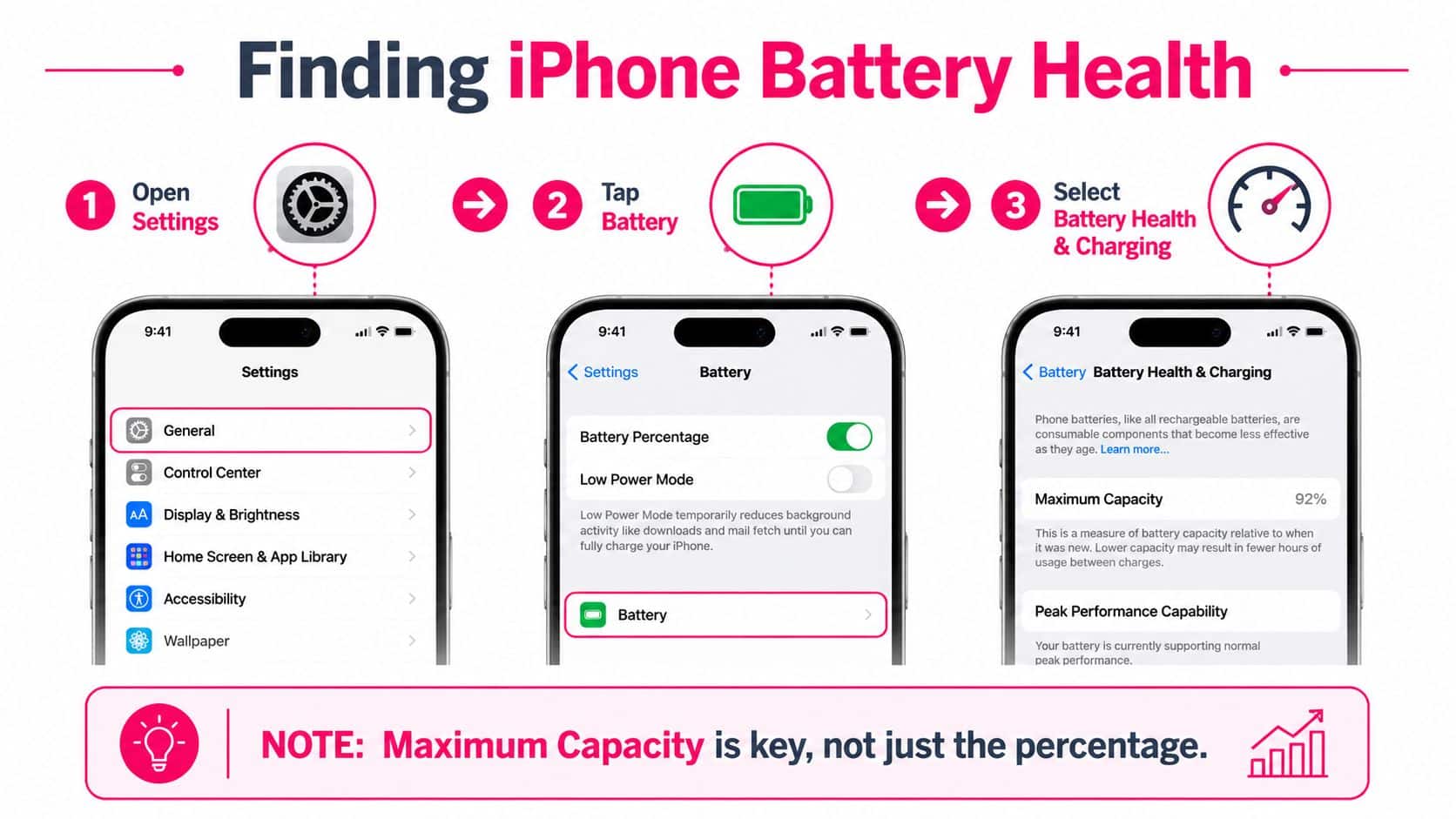
On iPhone 6 and later, use this path:
- Open Settings.
- Tap Battery.
- Select Battery Health or Battery Health & Charging, depending on the model and iOS version.
Apple confirms this route in its UK battery and performance guidance. The screen normally includes Maximum Capacity and a statement about Peak Performance Capability. Maximum Capacity compares the battery's present capacity with its capacity when new. Peak Performance Capability indicates whether the battery can support normal performance or whether iOS has applied management to reduce the risk of an unexpected shutdown.
What newer iPhones can reveal
On iPhone 15 models and later running iOS 17.4 or newer, the diagnostic screen can also show:
- Cycle count, which records completed charge-cycle usage.
- Manufacture date, useful when checking the age of a handset.
- First-use date, which can reveal whether a phone has been used for longer than a seller suggests.
- Replacement advice, where Apple recommends service.
- Maximum Capacity, the headline measure of remaining battery capacity.
Apple's UK support page for battery health information explains that iPhone 11 and later can show replacement recommendations, cycle count, manufacture date, and first-use date. The precise labels can vary with the model and iOS release, so don't assume an older iPhone is faulty because it lacks the newer fields.
Treat verification messages seriously
A message such as “Unable to verify this iPhone has a genuine Apple battery” means the battery-health information may be inaccurate. That doesn't prove the battery is dangerous or unusable, but it does mean you shouldn't rely on the displayed capacity when negotiating a second-hand purchase or deciding whether a replacement has solved the problem.
Older software may use different wording. On iOS 15.1 or earlier, Apple says an “Important Battery Message” appears instead of the newer “Unknown” wording. For UK buyers, the practical point is simple: an unfamiliar or unverified battery requires clarification, not panic. An authorised technician can inspect the device and replace the battery if needed.
Buying rule: Ask to see the Battery Health screen in person, and check whether iOS can verify the battery before you value the phone.
What Maximum Capacity and Service Recommendations Mean
Maximum Capacity provides a useful starting point, not a complete verdict. It estimates how much charge the battery can hold compared with when it was new. A lower figure generally means fewer hours between charges, but it cannot predict exactly how the phone will behave during demanding use, in cold conditions, or when the battery must deliver a sudden burst of power.
Apple's historical benchmark is that a normal iPhone battery should retain up to 80% of its original capacity after 500 complete charge cycles under normal conditions, as reported in UK coverage of Apple's battery replacement guidance. UK repair advice often treats 80% as a practical point at which replacement becomes worth considering. It is a decision threshold, not a promise that every battery below it will fail immediately.
Read the message beneath the number
A phone showing capacity around that benchmark may still suit a light user. Another handset with a similar reading might shut down, limit performance, or need repeated charging. The difference can reflect the battery's ability to deliver peak power, the owner's usage, and the accuracy of the battery data.
Check the wording under Peak Performance Capability. A normal-performance message means iOS currently considers the battery capable of supporting expected peak demand. A service or degraded-health message indicates that the battery's condition has become significant enough to affect reliability or capacity, even if the handset still turns on and works.
Apple introduced native Battery Health information with iOS 11.3, giving users access to Maximum Capacity and Peak Performance Capability from Settings. The feature became particularly relevant in the UK after the 2019 CMA consumer-protection case, when Apple agreed to improve information about battery health and performance management. The wording therefore matters when assessing a used phone or deciding whether to pay for a repair. It is intended to support that decision, rather than just display a score.
If an alert is unclear, use this guide to iPhone battery messages before assuming the handset needs replacing.
Why capacity alone can mislead
Apple warns that recalibration or an older battery can produce a service recommendation while the phone remains usable. A capacity figure that looks acceptable also cannot rule out rapid drain caused by usage, charging faults, software activity, or a battery that cannot deliver power consistently.
Combine the number with the service status and your symptoms. If all three point in the same direction, replacement is easier to justify. If they conflict, arrange an inspection rather than paying for a repair based on one reading. For a UK buyer, that check can prevent a misleading capacity figure from shaping the purchase price or repair decision.
Using Battery Diagnostics to Decide Between Repair and Replacement
The Settings report answers one question, whether iOS sees a battery problem. It doesn't always answer the commercial question, whether you should repair the phone, change your habits, or replace the handset.
Start with three signals:
| Signal | What it tells you | How to use it |
|---|---|---|
| Maximum Capacity | The battery's estimated capacity compared with when new | Use it as a wear indicator |
| Peak Performance or service status | Whether iOS reports normal performance or a battery-related limitation | Give warnings more weight than the percentage alone |
| Battery usage history | Which apps and activity may explain recent drain | Check whether the problem is consumption rather than battery wear |
Apple's iPhone battery guide says the Battery screen can show up to 10 days of usage history and highlight suggestions or insights that may explain unusual drain. Review this before booking a replacement. If one app has suddenly become responsible for much of your consumption, a battery swap may not solve the underlying problem.
When the built-in report is enough
A replacement is a reasonable next step when the phone has an ageing capacity reading, a service recommendation, and symptoms such as unreliable runtime or unexpected shutdowns. The case is even clearer when the iPhone is otherwise in good condition and meets your needs. Replacing a battery can extend the useful life of a familiar handset without forcing you to migrate data, accessories, and settings to another device.
For a second-hand purchase, use the report as a negotiation and risk check. Compare the Maximum Capacity with the phone's first-use date and cycle information where those fields are available. A seller's description may say “excellent battery”, but an unverified warning or a service message should prompt you to reduce your offer, ask for a battery replacement, or walk away.
When professional testing adds value
Professional inspection is worthwhile when the displayed information is inconsistent, when the battery can't be verified, or when the phone has physical signs of damage. A technician can examine the device, assess charging behaviour, check for related faults, and confirm whether the battery is the primary cause of the complaint.
That matters because a phone that drains quickly may have a charging-port issue, a damaged power circuit, or an app and connectivity problem. A battery replacement won't correct every form of power loss.
Repair decision: Use iOS to identify the likely problem, then use symptoms and inspection to confirm that a battery is the part worth replacing.
For local customers, an appointment-based workshop visit in Harlow can suit a handset that needs hands-on assessment. A nationwide mail-in service is more convenient when travel isn't practical. Repair My Crack offers both routes, with online booking and diagnostic support, so the right choice depends on urgency, location, and how uncertain the fault remains. For a more detailed decision guide, see how to know when your iPhone needs a battery replacement.
Calibrating Usage Habits and Recognising When to Book a Repair
Not every bad battery day proves that the battery has failed. Heavy screen use, poor signal, background activity, and a recent software change can make runtime look worse than the underlying hardware condition. Start by checking Battery usage history and deal with obvious consumption before treating the Maximum Capacity figure as the only explanation.
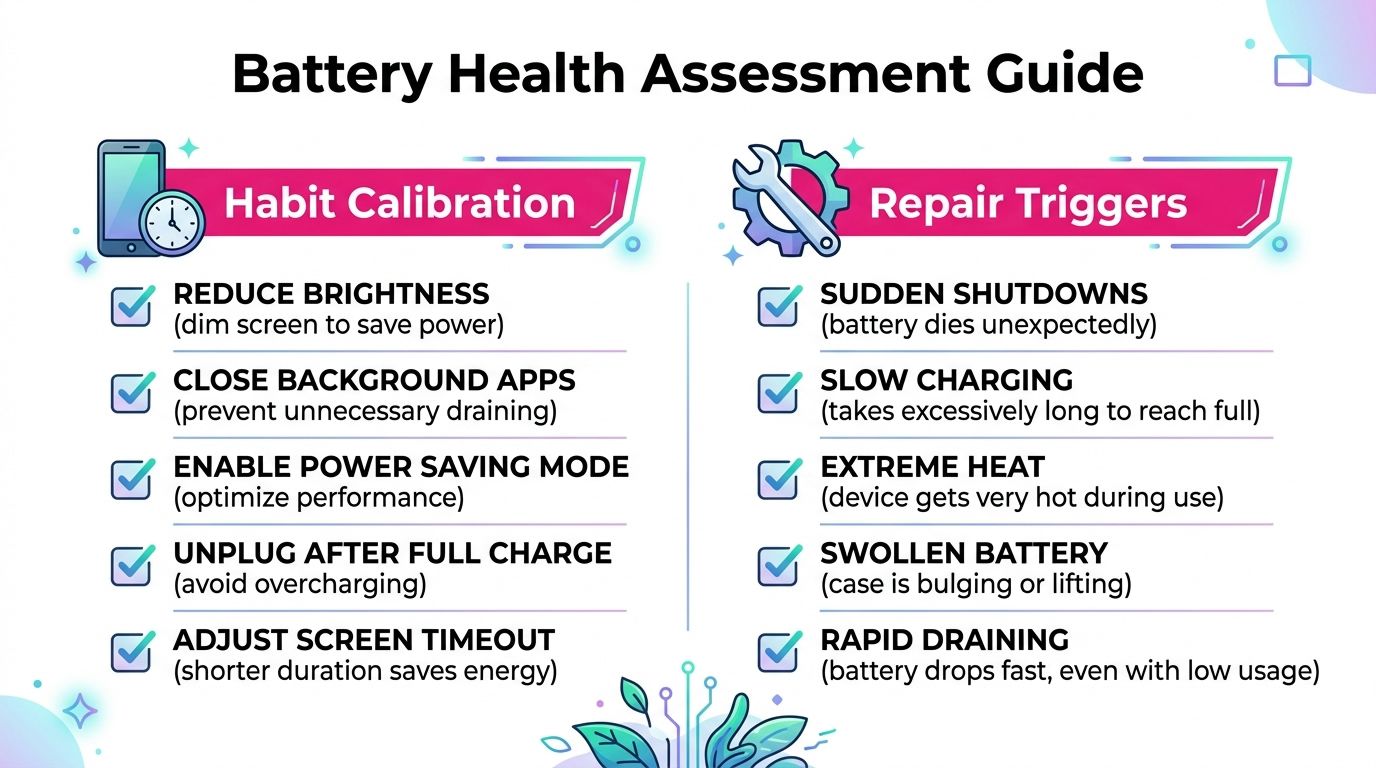
A sensible routine is to keep the phone cool, avoid leaving it in direct sun, and use Low Power Mode when you need to preserve charge. Reduce brightness to a comfortable level, review Background App Refresh, and remove unnecessary location access. These steps won't restore lost chemical capacity, but they can make the phone's runtime more predictable and help separate high consumption from battery wear.
If the reading appears inconsistent after a recalibration event or the phone has recently updated its reporting, give the device time to produce a stable picture through normal use. Don't repeatedly drain it to empty as a routine test. That creates inconvenience and doesn't repair an aged cell.
Signs that justify a booking
Arrange an inspection when the phone shows a repeated verification failure, a persistent service recommendation, or capacity below the practical replacement threshold alongside poor runtime. Sudden shutdowns, noticeable performance throttling, slow or intermittent charging, and unusual heat also deserve attention, particularly if they continue after basic usage changes.
On newer models, compare the manufacture date, first-use date, and cycle count. A recently purchased refurbished iPhone with a much older first-use date may have a battery that has already seen substantial use. An unverified battery may also mean that the displayed figures don't provide a dependable basis for resale or repair decisions.
Safety check: If the phone becomes unusually hot, swells, smells abnormal, or shows physical battery damage, stop charging it and arrange professional advice rather than continuing to test it.
A genuine Apple verification message is valuable because it tells you how much confidence to place in the report. When iOS says the battery can't be verified, use the screen as a warning about data quality, not as a precise health measurement. An authorised technician or reputable independent repairer can then inspect the handset and explain the available options.
Quick Battery Health Checklist for UK iPhone Owners
Use this checklist before buying, selling, or repairing an iPhone in the UK. The reading matters most when it supports a practical decision about the handset's condition and likely repair needs.
- Open the correct menu: Go to Settings > Battery > Battery Health or Battery Health & Charging on iPhone 6 and later.
- Read more than Maximum Capacity: Check Peak Performance Capability and any service recommendation. A percentage alone cannot explain sudden shutdowns, throttling, or poor runtime.
- Use the practical benchmark: Apple's historical design benchmark is up to 80% after 500 complete charge cycles under normal conditions. Treat it as guidance, not a promise of real-world battery life.
- Check the report's credibility: If iOS says Apple cannot verify the battery, the displayed health information may be inaccurate. Factor that uncertainty into a purchase or repair decision.
- Review recent usage: Battery settings can show up to 10 days of usage history, helping identify an app or activity behind sudden drain, according to Apple's iPhone user guide.
- Inspect newer models carefully: On iPhone 11 and later, review cycle count, manufacture date, first-use date, and replacement advice where available.
- Choose repair when appropriate: Replacing the battery may make more sense than replacing a functional handset, particularly when the screen, cameras, and charging port remain in good condition.
- Book an inspection when signals conflict: Repeated shutdowns, unusual heat, charging faults, verification warnings, or persistent throttling need more than a percentage check.
- Plan the cost: Compare the handset's condition and value with this iPhone battery replacement cost guide for the UK before committing.
If the report remains unreliable or symptoms continue, Repair My Crack can assess the device through its Harlow workshop or UK-wide mail-in service. Visit Repair My Crack to check the available repair route.
, James Waterston, Device Repair Specialist at Repair My Crack