A phone repair can become a bit of a faff when the screen is dead or the handset won’t charge. Fortunately, finding the IMEI is usually quick, even if you can’t unlock the device.
If you’ve searched for “find IMEI number” because your phone is heading to a repair bench, you’re in the right place. The IMEI identifies the handset, while the model, symptoms and repair history help us understand what has gone wrong.
How to Find IMEI Number on iPhone, Samsung and Pixel
The quickest method depends on the brand. Check the phone itself first, then use the box, account records or a connected computer if the device won’t respond.
iPhone
Open Settings > General > About and scroll down to find the IMEI or IMEI/MEID. Apple’s official IMEI guidance also covers EID, serial numbers and other device details.
If the screen works but touch does not, connect the iPhone to a Mac using Finder, or to a Windows computer using the Apple Devices app or iTunes. You can also sign in to your Apple Account and check the device list. The original box should show the IMEI on its barcode label.
Samsung Galaxy
On most Galaxy phones, open Settings > About phone. You can also open the Phone app and dial *#06#, which normally displays the IMEI and serial number.
If the screen is unusable, check the original box, purchase receipt or mobile contract. Samsung Members may also show the registered handset details. Samsung’s UK device-number guidance lists several ways to locate them.
Google Pixel and iPad
On a Pixel, go to Settings > About phone and look for the IMEI. If the phone is still linked to your Google Account, Find Hub or Google’s device records may show it when the handset is offline.
For an iPad, use Settings > General > About. Only iPads with mobile data have an IMEI. Wi-Fi-only models normally have a serial number instead. The IMEI may also appear on the original packaging.
Finding the IMEI When the Phone Won’t Turn On
The best way to find IMEI number details on a dead phone is to check records created before the fault happened. This is especially useful after a drop, liquid exposure or charging problem.
Check the box and account records
Look at the barcode label on the original packaging. Keep an eye out for two IMEIs, as dual-SIM phones can have IMEI 1 and IMEI 2. Record both if they appear.
You may also find the number in an Apple Account device list, Samsung Members, Google device records, a network account or a purchase receipt. For an iPhone, a previously trusted computer can sometimes display the number even when the handset screen remains black.
The IMEI does not diagnose the fault
For a “device won’t turn on or won’t charge” diagnosis, the IMEI only confirms which handset has arrived. It won’t tell us whether the problem sits with the battery, charging port, display, connector or main board.
It also isn’t a password or a way to unlock the phone. Treat it as private device information and avoid posting it publicly.
What to Record Before Sending the Phone
Once you find IMEI number details, write them down with the exact model and your repair notes. That gives the technician a clear starting point and reduces the chance of a mix-up.
Note every symptom
Include:
The IMEI or IMEI numbers, serial number and exact model.
What happened, such as a drop, liquid exposure or sudden charging failure.
Whether the phone rings, vibrates, heats up or connects to a computer.
Any previous repair, screen replacement or battery change.
Whether the fault is constant or appears only at certain angles.
Take photographs of the front, back, corners, camera area and charging port. Our phone repair preparation checklist covers useful pictures and details to include before posting a device.
Protect your data first
Back up photos, messages, contacts and authentication information while the phone still works. Apple recommends turning off Find My before service. If you can’t do that on the handset, use the Find My app or your Apple Account.
Remove the SIM card and don’t send loose accessories unless the repairer asks for them. If testing requires the passcode, provide it through the repair booking process rather than writing it on the parcel. Our passcode guidance for phone repairs explains why technicians may need access after a repair.
What an IMEI Cannot Tell You About Drop Damage
An IMEI identifies the device, but the symptoms point towards the repair. Our phone hardware troubleshooting in the UK starts with the timing of the fault, the physical condition and the functions that changed.
Record screen and component symptoms
Common screen or display fault symptoms include flickering, black patches, dead touch areas, coloured lines or a screen that stays black while the phone vibrates.
An iPhone component fault after a drop can involve the display, charging port, camera or an internal connector. A Samsung component fault after a drop may affect a button, camera or charging connection without leaving an obvious mark.
A Google Pixel component fault after a drop can appear as intermittent charging, restarts or a soft volume button. An iPad component fault or diagnosis may involve the display assembly, battery connection or charging circuit.
A workshop example
A recent Pixel arrived after hitting a pavement. The screen had no major crack, but the volume-down button felt soft and worked only intermittently. Inspection found that the side rail had taken the impact and was pressing against the button assembly.
The IMEI helped us match the device to the booking. The symptoms and physical checks showed that this was hardware damage, rather than an Android settings issue.
Sending the Phone for Repair
After recording the IMEI and backing up your data, pack the handset tightly in protective material inside a sturdy box. Include the order number, describe every known fault and keep the tracking details until the phone returns.
We offer UK mail-in phone repairs as well as appointment-only drop-off repairs in Harlow, Essex. We inspect the device before chargeable work where possible and contact you if the confirmed repair differs from the original booking. If no fault is found, an inspection fee may apply under our standard terms.
Repairs use quality replacement parts and include warranty cover according to the part and service. Independent repair may affect a remaining manufacturer warranty, so compare both options if the phone is still covered.
If you had to search for “find IMEI number”, save the result somewhere secure with the model, serial number and fault description. Record both IMEIs on a dual-SIM phone, back up your data and photograph the device before it leaves your hands.
That small amount of preparation makes the handover easier and gives us better information when testing begins. The IMEI identifies the handset, but careful notes help us identify the repair.
James Waterston, Device Repair Specialist at Repair My Crack
You've just dropped your Pixel, the glass has spidered, and the phone still lights up. That's the point where panic can lead to a bad decision, either by rushing into the first cheap fix you find or by assuming the handset is done for. It usually isn't. A google pixel screen repair is often the sensible move, but only if you first work out what's broken, what the repair route looks like in the UK, and whether the numbers still make sense for your model.
The drop lasts a second. The decision lasts much longer. I've seen people pick up a Pixel from a tiled floor, wipe the glass with their sleeve, and keep using it for weeks, only to return once the crack has spread, touch has become unreliable, or the display has started showing extra damage.
The two questions that matter
First, work out whether you've got glass damage only or a deeper display fault. A crack on the surface is one thing. A black patch, flicker, dead area, or vertical line means the screen assembly may be affected too, and that changes the repair.
Second, decide whether the right route is authorized repair, local repair, or mail-in service. Google's UK repair pathway treats screen work as a formal after-sales service, with a documented repair history and a 90-day warranty on authorized repair or replacement work from the date of repair or replacement, which gives you a clean benchmark when you compare options. Google's UK Pixel repair centre information shows that screen repairs are part of the supported route, not an informal workaround.
If you're a parent, a small business owner, or just someone carrying a single handset, the choice is usually practical, not emotional. You need the phone back, you need your data protected, and you need to know whether fixing it still beats replacing it.
Practical rule: don't price the repair until you know the fault. A cracked outer layer and a damaged display are not the same job.
That is why this guide stays focused on the decision that matters most. What's broken, what it'll cost in the UK, and which repair route gives you the least headache.
A cracked Pixel also raises a data question straight away, especially if you plan to post it in. If the phone still powers on, back it up before you hand it over. If the screen is badly damaged but the device is alive, a specialist such as Repair My Crack Pixel touch screen repair can help you deal with the hardware side while you keep control of what happens to your files.
How to Tell What Kind of Pixel Screen Fault You Have
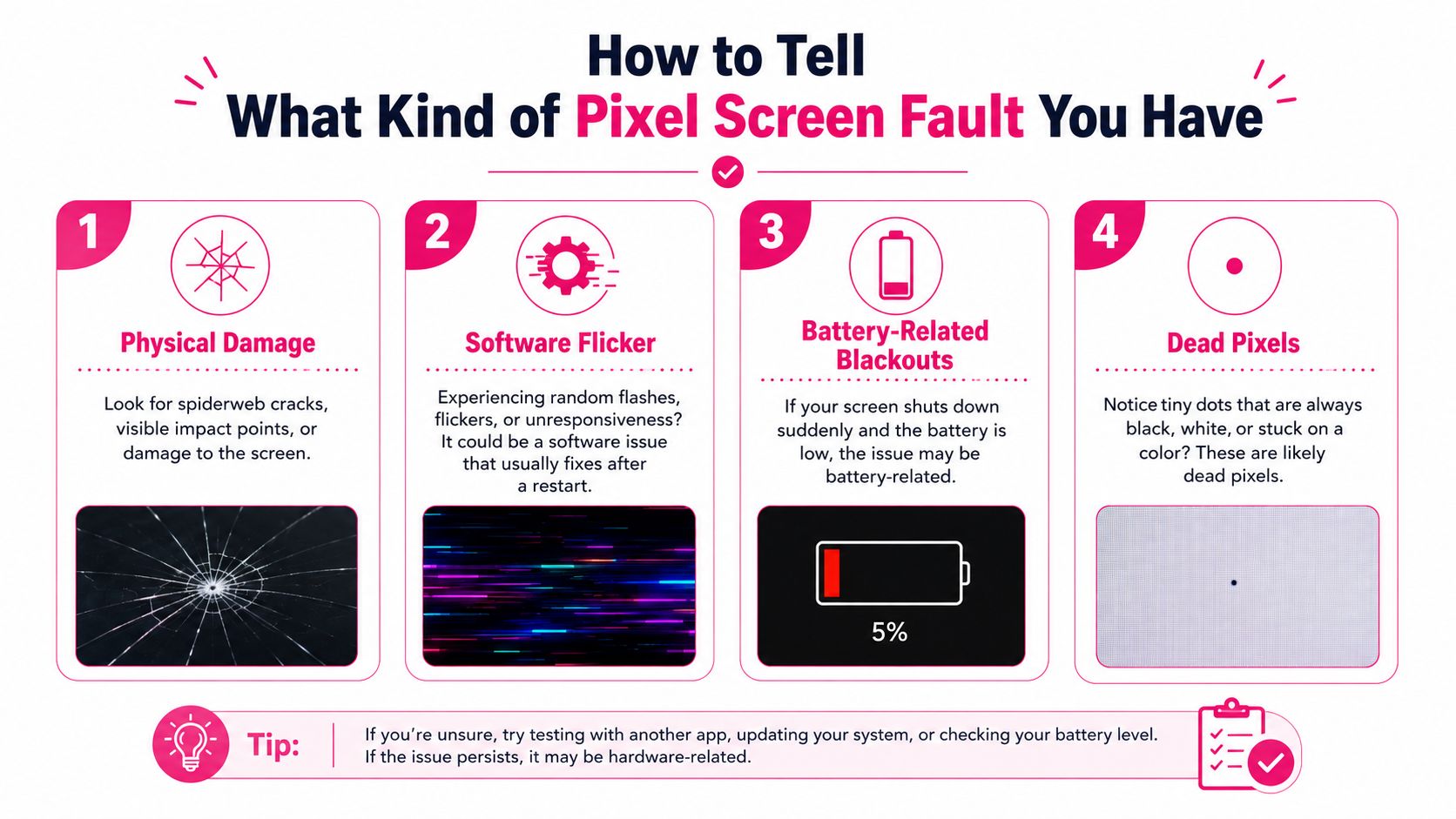
Start by separating physical damage from symptoms that look like a screen fault but may not be one. Google's own support tells Pixel owners to check for system updates first, try button-based troubleshooting, and only then book repair if the issue persists. Google's screen appearance guidance also makes it clear that dead pixels and physical cracks are repairable faults, so don't confuse a visible crack with a software or power issue.
What points to a screen replacement
If you can see a spiderweb crack, a lifted edge, or sharp glass, treat it as a hardware problem. The same goes for a display that shows a black patch, permanent coloured dots, flicker that won't clear after a restart, or areas where touch has stopped responding. Those are not cosmetic issues.
A dead-looking Pixel isn't always dead, either. Sometimes the phone is still running and the display has failed, which is why the reset and update checks matter before you pay for a new screen.
What can be software or power related
A random flash, temporary freeze, or a screen that wakes up again after a reboot can point to software rather than panel damage. Low power symptoms can also look like screen failure when they're really battery or shutdown related. That's exactly why Google pushes diagnostics before repair.
If the glass is cracked and the display is behaving badly, assume repair. If the display is glitching but the glass is intact, test the phone properly before spending money.
If you want a straight path into a specialist touch-screen check, the relevant repair page is here. Use it only after you've ruled out the obvious software stuff. That saves time and avoids paying for a panel swap you didn't need.
UK Cost of Google Pixel Screen Repair by Model
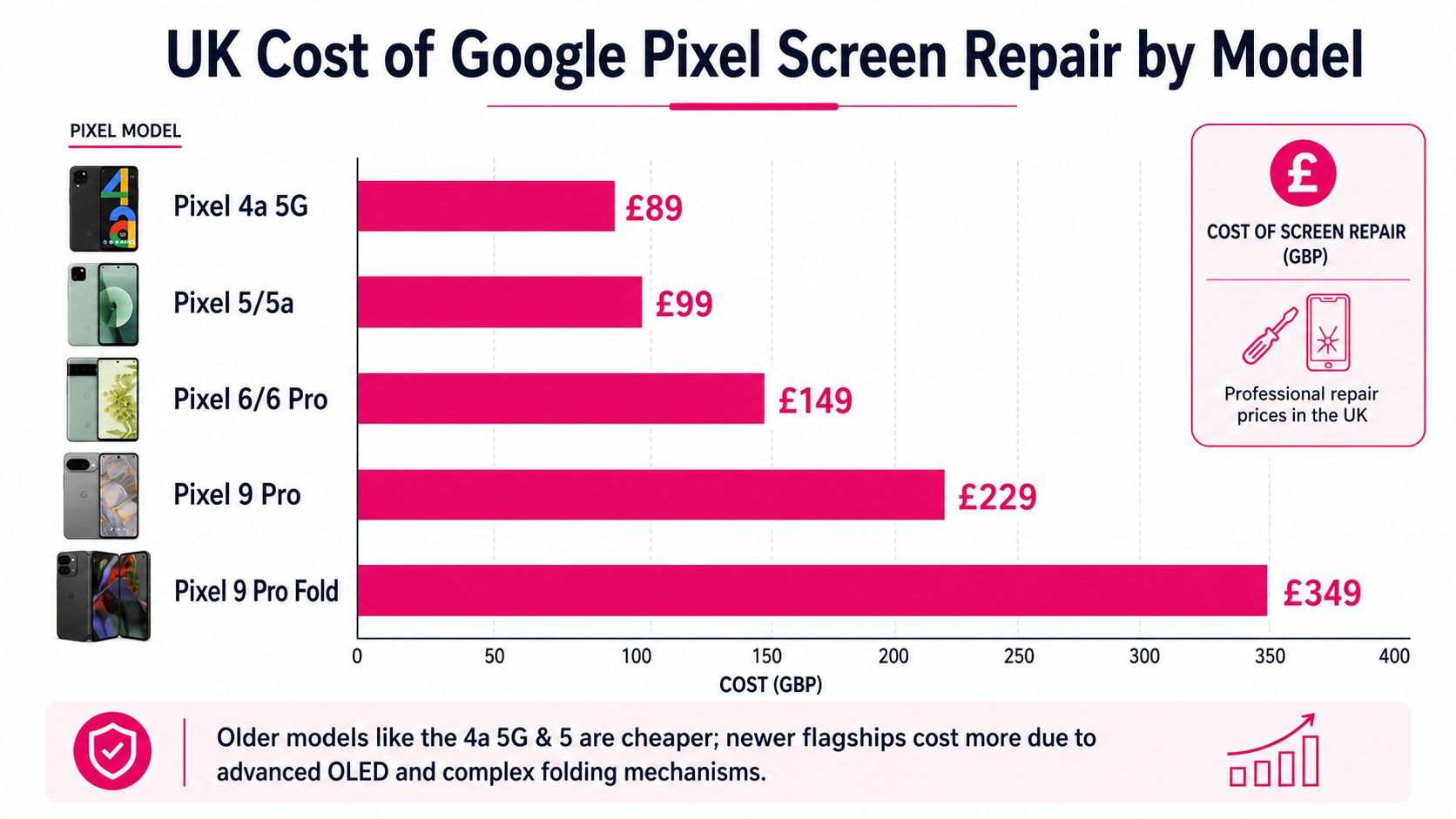
A cracked Pixel screen does not all land in the same price band. Older slab-style models are cheaper to put right, while newer phones with tighter OLED integration and foldable displays climb fast. In the UK, independent estimates put repairs at about £40–£90 for older models such as the Pixel 4a 5G, Pixel 5, and Pixel 5a, then around £60–£130 for the Pixel 6 and Pixel 6 Pro, with premium newer models going higher. The UK cost guide also puts the Pixel 9 Pro at about £180–£220 and the Pixel 9 Pro Fold inner display at about £220–£380.
Why newer Pixels cost more
The reason is simple. A flat screen is a straightforward swap. A modern OLED module with tighter integration is a more involved job, and a foldable inner display is another step up again because the assembly is more delicate and the margin for error is much smaller.
I would never price up a Pixel 5 repair against a Pixel 9 Pro Fold repair as if they are comparable. They are different jobs. Parts cost more, the labour takes more care, and the chance of making a bad repair is higher on the newer designs.
Reading a quote properly
If a quote looks steep, check exactly what is included. You want to know whether the figure covers only the display assembly, or whether labour, testing, and any resealing work are included as well. Ask whether the quoted part is for the exact model, because vague wording usually hides the quality of the repair.
The practical call is straightforward. From the Pixel 6 onwards, repair is usually still cheaper than replacing the whole phone. That does not mean you should fix it blindly, but it does mean the numbers often still favour repairing the handset rather than buying a new one.
Comparing Your Pixel Repair Options in the UK
A cracked Pixel screen leaves you with three proper options in the UK, Google's authorised route, a local high-street shop, or a specialist mail-in service. Judge each one on the same four points every time, cost, turnaround, warranty, and convenience. That is the quickest way to spot a quote that looks fair on paper but causes trouble later.
Repair route
Typical cost
Turnaround
Warranty
Convenience
Google authorised repair
Varies by model and issue
Depends on booking and service route
90 days on authorized repair or replacement work
Good if you're already in the official flow
Local high-street shop
Usually price-led and shop-specific
Often quick if parts are in stock
Depends on the shop
Best if you want face-to-face service
Specialist mail-in service
Usually competitive for screened faults
Good if you're not near a city
Often 12 months on eligible repairs, according to the provider
Strong for UK-wide access
The route I'd pick in most cases
If you live near a reputable local specialist and need the handset back fast, a walk-in repair is the sensible move. If you're outside a big city, mail-in usually wins because you avoid the hassle of ringing around for stock, booking slots, and wasted trips.
Google's route has a clean structure. You start online, enter the device IMEI or serial, and then choose mail-in or walk-in after the fault is selected. The official Google's Pixel repair support page is also clear that supported-country repair options sit in the Pixel repair centre, with warranty status shown there too.
If paperwork matters to you, the authorised route is worth the extra cost. If it doesn't, a trusted specialist mail-in repair is usually the calmer and simpler choice. I'd rather see you pay a bit more for clear terms than chase the cheapest quote and get dragged into disputes over parts, labour, or what was included.
Practical rule: choose the route with the clearest terms, even if it costs a little more.
If you want a quick checklist before you hand the phone over, use this repair checklist. It keeps you from missing the obvious steps, which matters more than people think once the handset leaves your hands.
Preparing Your Pixel Before Posting It for Repair
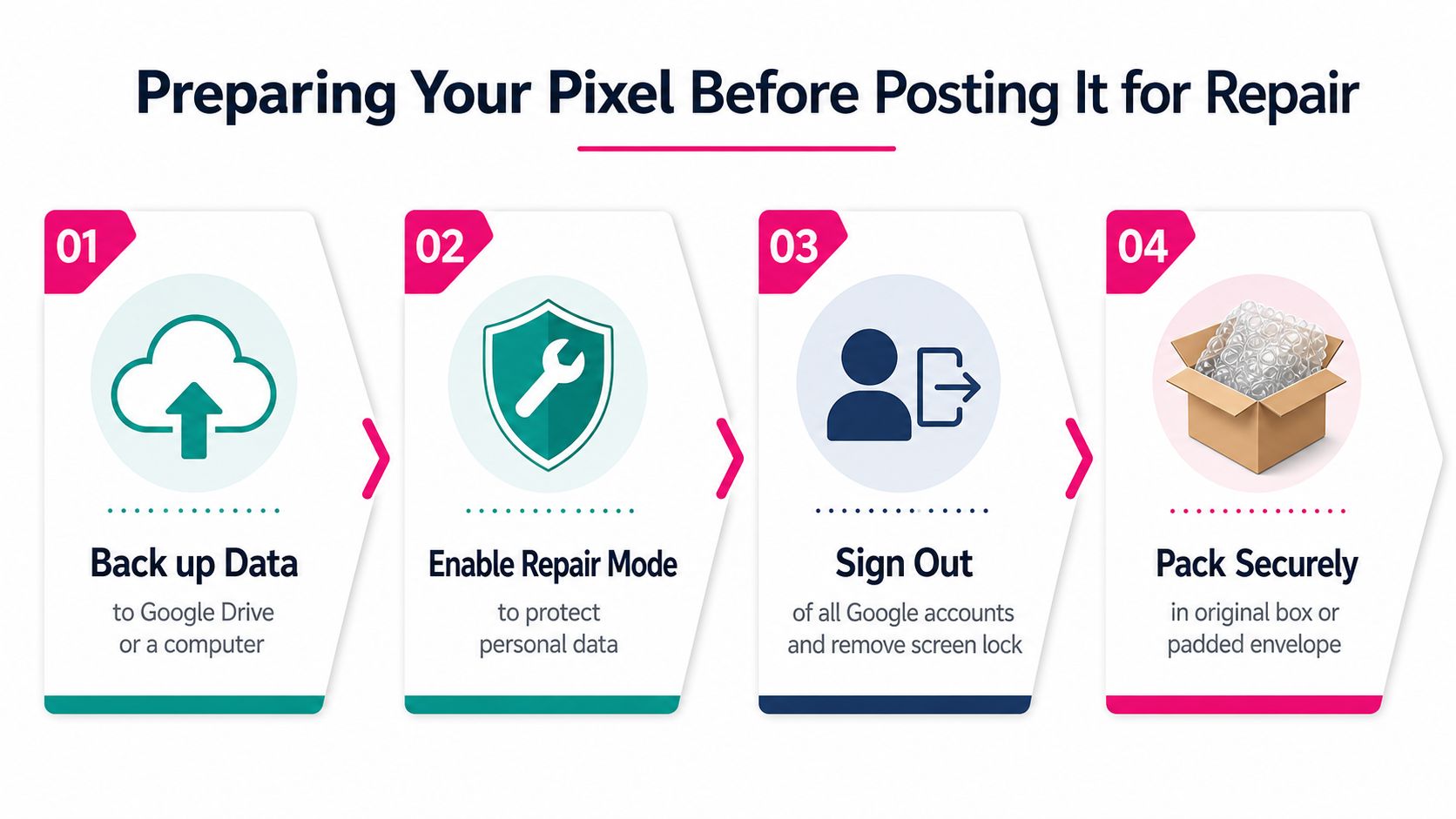
Do the privacy work before you pack the phone. Google's official repair flow tells users to back up data, remove the SIM, and enable Repair Mode before walk-in or mail-in service, and if Repair Mode isn't available, you may need to factory reset the phone. Google's repair mode guidance is the clearest signal here, and it's sensible to follow the same approach with any reputable third-party repairer.
The data steps that actually matter
Back up your photos, messages, and contacts before anything else. If the display still works well enough, do it immediately. If the screen is fading, don't wait until it dies.
Then sign out of your Google accounts where needed, remove the SIM, and turn off any lock that would block service access once the handset arrives. Paired watches and earbuds can stay separate, but make sure you know which accessories are being sent and which are staying with you.
If Repair Mode is available, use it. If it isn't, reset the phone yourself before posting it.
A useful checklist for preparing any handset is this repair checklist. It's worth following even if you're confident the data is backed up, because the smallest omission is the one that slows everything down.
What not to do
Don't keep using a cracked screen as if nothing's happened. Don't press hard on the damaged area. And don't post the phone without a backup just because you're hoping the repair will be routine.
That's the trap with screen faults. People think of them as hardware only, but the risk is data handling. Get that part right first.
The Mail-In Repair Workflow Step by Step
A proper mail-in repair should feel organised from the start. At Repair My Crack, the process begins online, then moves into tracked Royal Mail postage, in-house diagnostics, the screen repair itself, testing, and tracked return dispatch. The service also uses the mail-in phone repairs page as the route into booking and status tracking.
What happens after you book
You book the repair, then receive packaging and postage instructions. The device goes in with the postage label, and the repair team checks the handset on arrival before carrying out the screen replacement. Once that's done, the phone is tested and sent back with tracked delivery.
The practical benefit is simple. You're not chasing an inbox for updates, because the process is designed around a repair-tracking page. That matters more than people think, especially if the handset is your work phone.
Practical rule: a good mail-in repair should tell you where the phone is, what's being checked, and when it's coming back.
The service also includes free tracked Royal Mail postage both ways, and transit insurance up to £750. That's enough to cover the normal worry about sending a valuable device in the post, provided you've packed it properly and followed the intake instructions.
What you should expect back
You should get the same handset back, repaired, tested, and ready to use. The point of a structured repair is that the phone returns with the display behaving normally, not just looking cleaner on the outside.
If your repair provider can't explain the diagnostic stage clearly, that's a warning sign. A screen swap isn't just about fitting glass, it's about making sure the phone leaves working properly.
Repair or Replace When the Screen Goes
If the handset is otherwise sound, repair it. If the phone is already close to the end of its useful life, or the repair quote sits too near replacement cost, replace it or sell it for parts. That is the cleanest call, and it stops you spending proper money on a Pixel you were already ready to move on from.
The maths I use with customers
Work out the repair price, then divide it by the months you realistically expect to keep the phone. You get a rough cost per month of remaining use, which is a far better guide than gut feel. A cheap repair on a phone you will keep for another year is one thing. An expensive repair on a handset you were already planning to upgrade is another.
Pixel 8 owners need one extra check. Google's Pixel 8 Extended Repair Program covers a very specific screen failure mode, a vertical line from bottom to top or display flicker, and includes one free display replacement for eligible devices with a 90-day warranty on that repair. Google's Pixel 8 programme details matter because some display faults are treated as recognised defects, not ordinary accidental damage.
The data steps that matter
Before you spend a penny, back up the phone and make sure your photos, messages, and account access are safe. If the screen still responds, sign out of anything sensitive, remove payment cards if you can, and check whether your repair route needs a PIN, a factory reset, or both. Mail-in repair is where people get careless, and that is where avoidable data problems start.
My blunt recommendation
Repair newer Pixels unless the handset has several serious faults. The numbers usually still make sense. Replace only when the screen job is the start of a longer list, or when the total spend no longer feels sane for the age of the phone.
A cracked Pixel screen is annoying, not fatal. The wrong move is paying for a repair before you have checked whether the device still deserves it.
Key Takeaways and Getting Your Pixel Sorted
A cracked Pixel screen gives you four decisions, and they're the only ones that matter. First, confirm whether it's really the screen or a software, battery, or display issue. Second, place the model into the right cost bracket. Third, choose the route that fits your location and comfort level. Fourth, decide whether you're happy with the data steps before the handset leaves your hands.
The good news is that most Pixel screen faults are fixable. Google's own repair path includes screen repairs, the authorised route carries a 90-day warranty on the work, and specialist UK mail-in options give you a way forward if you don't live near a shop. The phone isn't ruined just because the glass is.
I'd keep the tone simple. Don't rush, don't guess, and don't hand the phone over until your data is backed up and the repair route is clear. If you want help choosing the right repair path, James Waterston and the Repair My Crack team can talk you through the options and book the right Pixel screen repair without the usual back-and-forth.
If your Pixel's screen has gone and you want a straight answer on cost, turnaround, and postage, book it with Repair My Crack. They handle UK-wide mail-in Pixel repairs, including cracked screens, with tracked postage and clear intake steps, so you know exactly what's happening before you send the phone.
By continuing to browse our site, you agree to the use of our cookies.
This website uses cookies to improve your experience while you navigate through the website. Out of these, the cookies that are categorized as necessary are stored on your browser as they are essential for the working of basic functionalities of the website. We also use third-party cookies that help us analyze and understand how you use this website. These cookies will be stored in your browser only with your consent. You also have the option to opt-out of these cookies. But opting out of some of these cookies may affect your browsing experience.
Necessary cookies are absolutely essential for the website to function properly. These cookies ensure basic functionalities and security features of the website, anonymously.
Cookie
Duration
Description
cookielawinfo-checkbox-analytics
11 months
This cookie is set by GDPR Cookie Consent plugin. The cookie is used to store the user consent for the cookies in the category "Analytics".
cookielawinfo-checkbox-functional
11 months
The cookie is set by GDPR cookie consent to record the user consent for the cookies in the category "Functional".
cookielawinfo-checkbox-necessary
11 months
This cookie is set by GDPR Cookie Consent plugin. The cookies is used to store the user consent for the cookies in the category "Necessary".
cookielawinfo-checkbox-others
11 months
This cookie is set by GDPR Cookie Consent plugin. The cookie is used to store the user consent for the cookies in the category "Other.
cookielawinfo-checkbox-performance
11 months
This cookie is set by GDPR Cookie Consent plugin. The cookie is used to store the user consent for the cookies in the category "Performance".
viewed_cookie_policy
11 months
The cookie is set by the GDPR Cookie Consent plugin and is used to store whether or not user has consented to the use of cookies. It does not store any personal data.
Functional cookies help to perform certain functionalities like sharing the content of the website on social media platforms, collect feedbacks, and other third-party features.
Performance cookies are used to understand and analyze the key performance indexes of the website which helps in delivering a better user experience for the visitors.
Analytical cookies are used to understand how visitors interact with the website. These cookies help provide information on metrics the number of visitors, bounce rate, traffic source, etc.
Advertisement cookies are used to provide visitors with relevant ads and marketing campaigns. These cookies track visitors across websites and collect information to provide customized ads.